

Have you ever wondered what the Ask -> Plan -> Human in the Loop -> Agent workflow actually looks like when we use it to build something real?
In my previous blog, Agentic AI in Power BI and Fabric, Part 4: From Skills to an Agentic Report Theme Audit Workflow, I explained this workflow and showed how skills, tools, agents and Human in the Loop can work together in a more structured AI-assisted process.
There is an important point from that article which is worth repeating here. The Ask -> Plan -> Human in the Loop -> Agent workflow is not, by itself, an autonomous agentic AI process.
Yes, we are using an AI agent. It can investigate the problem, understand the codebase, create an implementation plan, use tools and eventually change the project. However, the human is still actively driving the process between those stages. We ask the initial questions, review the plan, challenge or correct it when required, decide when it is good enough, and only then allow the agent to begin the implementation.
I do not think there is anything wrong with that. For many software and data projects, this is currently a sensible way of working with AI. I want the agent to do much of the heavy lifting, but I also want to understand what it plans to do before it starts changing things. That Human in the Loop checkpoint is important.
In this blog, I take that workflow out of the diagrams and use it in a real project. We are building a Microsoft Fabric App.
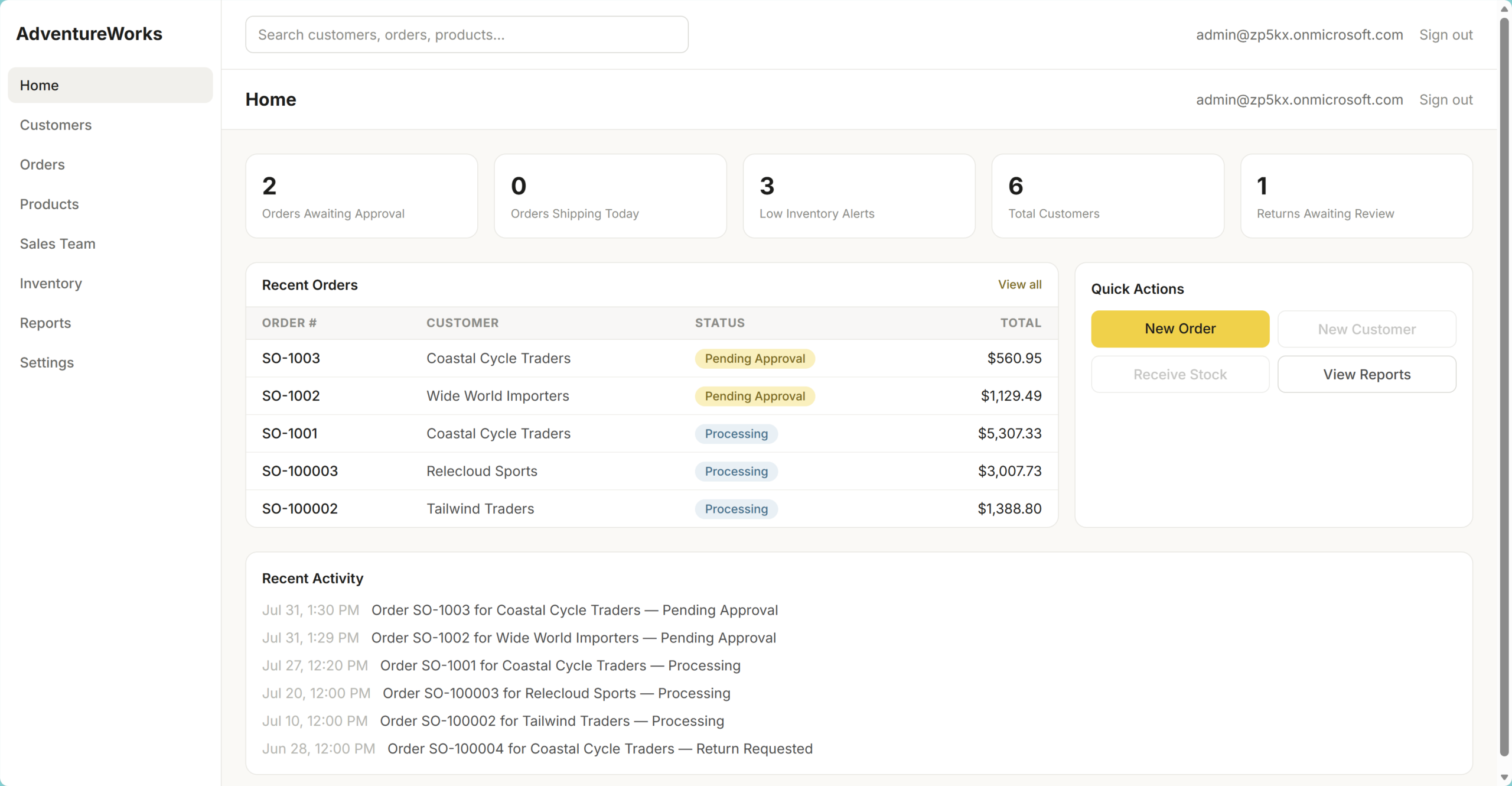
Microsoft Fabric Apps is a new code-first experience for building applications directly in Microsoft Fabric. It can create and deploy an application together with its operational data resources inside a Fabric workspace. The application in this experiment is an AdventureWorks-style sales application with customers, products, inventory, sales orders, an approval workflow and basic reporting.
This experiment is particularly interesting because I am not an application developer and I do not know TypeScript or React. I work mainly with data modelling, Power BI, DAX, Power Query and Fabric architecture. I know the business outcome I want and understand the architecture and data, but I need GitHub Copilot to help me work through the application implementation.
The application was created locally, deployed to Fabric and tested with a second user. It worked, but that is not the most important result. The more useful outcome was seeing how to give an AI coding agent enough context, how to control its scope, and where the human review points need to remain.
This post is another seed for my wider Agentic AI in Power BI and Fabric series. The series began with terminology and mental models, then moved into setting up Visual Studio Code and GitHub Copilot safely, using MCP servers with Power BI, and building reusable skills and agent workflows. This example sits between those concepts and a fully autonomous workflow. Before we build autonomous workflows where an agent decides when to plan, use a skill, call a tool or take an action, it helps to see what each stage does in a real project.
What This Blog Will Cover #
This post covers:
- what Microsoft Fabric Apps is, and where it currently makes most sense
- the tenant and local development prerequisites
- the Ask, Plan, Human in the Loop and Agent workflow I used with GitHub Copilot
- how the Fabric App scaffold, database, application and deployment were created
- the practical lessons from testing and sharing the application
- why Fabric Apps does not simply replace Power BI or Power Apps
The full development process took around 4.5 hours. The YouTube video is much shorter because the long implementation and agent-thinking periods are fast-forwarded. You can watch the full video here👇:
If you’d like to listen to the content on the go, here is the AI generated podcase made from the content of this blog 👇:
What Are Microsoft Fabric Apps? #
Fabric Apps should not be viewed as another generic website-building platform. It is a code-first application development experience that runs within the Fabric ecosystem. In my view, the most interesting use cases are therefore internal operational applications that are close to data already managed in Fabric.
Typical examples include sales management, inventory, procurement, approval workflows and other business processes where users need to create, update and act on operational data. This is different from a traditional Power BI reporting scenario, where the main purpose is analysing data rather than changing it.
The distinction matters. While a polished shopping-style demo can make Fabric Apps look like a public e-commerce platform, the current value proposition is stronger for organisation-wide business applications where Fabric capacity, governance, identity and data services are already in place.
Prepare the Fabric Environment #
Before creating an application, Fabric Apps must be enabled in the tenant and the target workspace must be backed by Fabric capacity.
Enable Fabric Apps #
In the Fabric portal, open the Admin portal, search tenant settings for “Fabric Apps”, and enable the setting. In a production tenant, it is sensible to start with a specific security group rather than enabling a new capability for the whole organisation immediately.
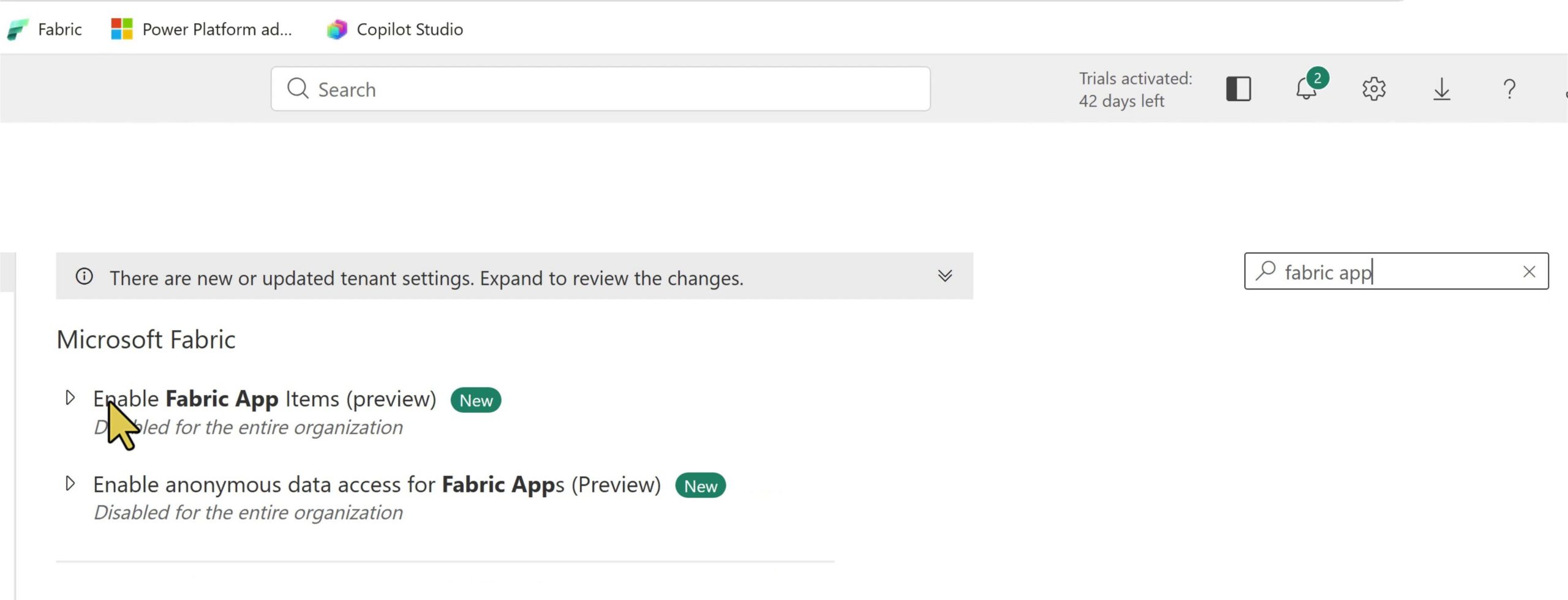
The next setting is “Enable Anonymous Data Access for Fabric Apps”. This is intended for public or unauthenticated scenarios. It may be relevant for a public product catalogue, timetable or similar content, but it was not required for this application and remained disabled.
Anonymous access should be treated as an architecture and security decision, not as a setting to enable only because it is available.
Install the Local Requirements #
Fabric Apps development uses the Rayfin SDK and CLI. The official documentation provides the installation steps, but the local runtime requirements must be available first.
In my case, the first attempt to install Rayfin failed because npm was not available. After installing Node.js and npm, the Rayfin CLI installed successfully and the local environment was ready.
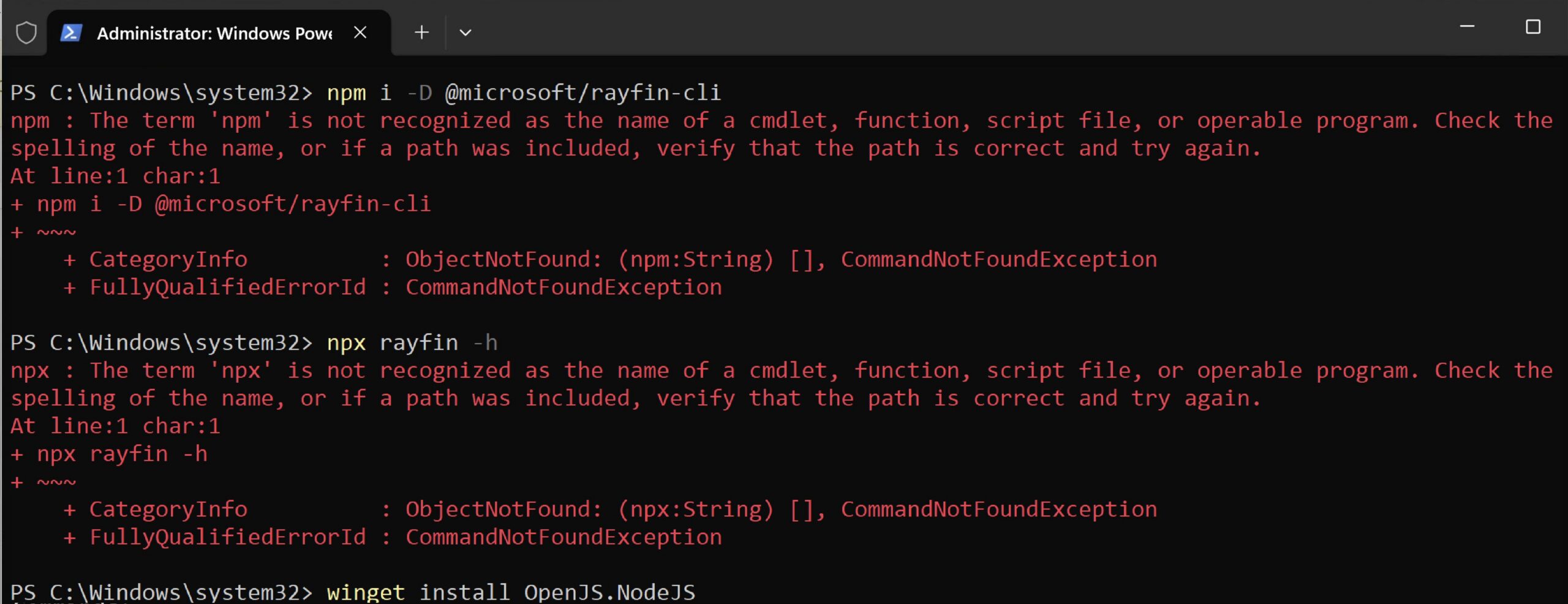
This is a small but practical point. Agentic development does not remove normal development dependencies. The agent can help diagnose a missing dependency or suggest the correct command, but it still needs a working local environment. It is a simple thing, but easy to forget when we start using these tools.
Start With Context, Not Implementation #
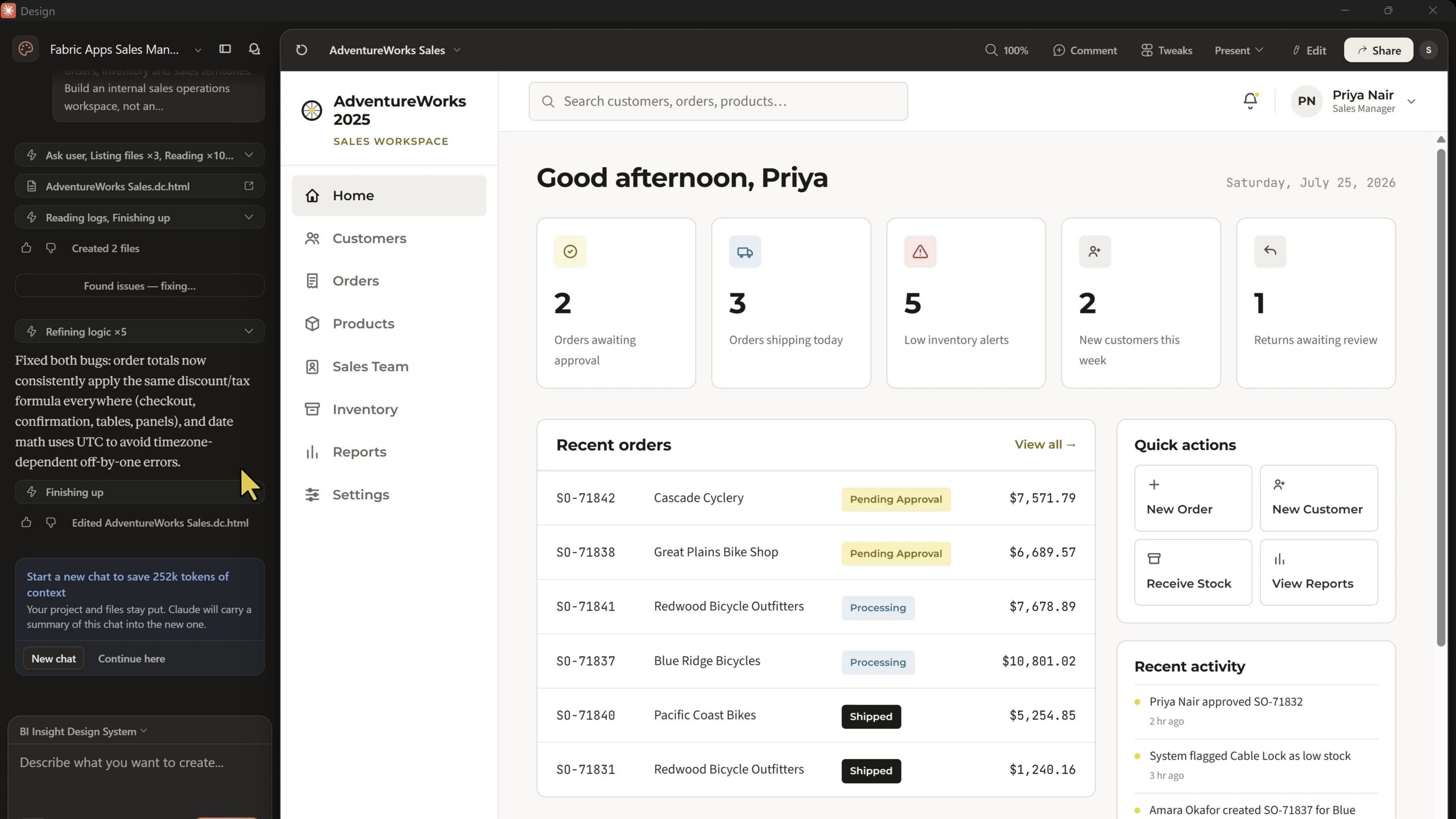
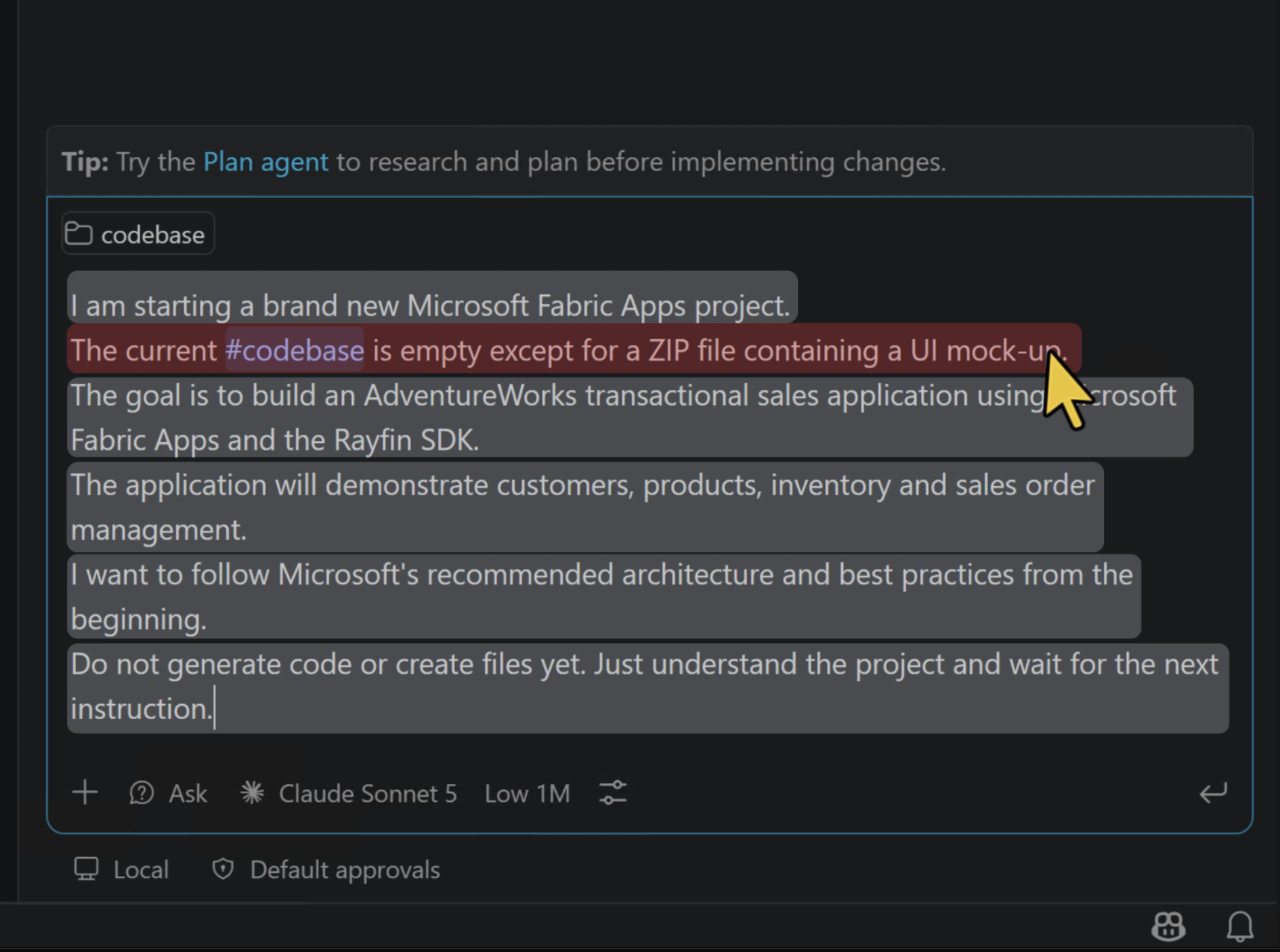
The project started with a mostly empty repository and a ZIP file containing a UI mock-up. I used GitHub Copilot Ask mode first, with a deliberately narrow instruction: understand the project and wait. Do not create files or generate code.
This created an important separation between understanding the task and implementing the task. An agent asked to do both at once has to make assumptions about the product, architecture and codebase while it is already changing files. That is not a good starting point.
The first project context covered the required business areas: customers, products, inventory and sales orders. The UI mock-up then gave the agent a concrete visual target. It was not expected to invent the application, design every screen and implement all technical layers from one vague prompt.
Ground the Agent in Official Documentation #
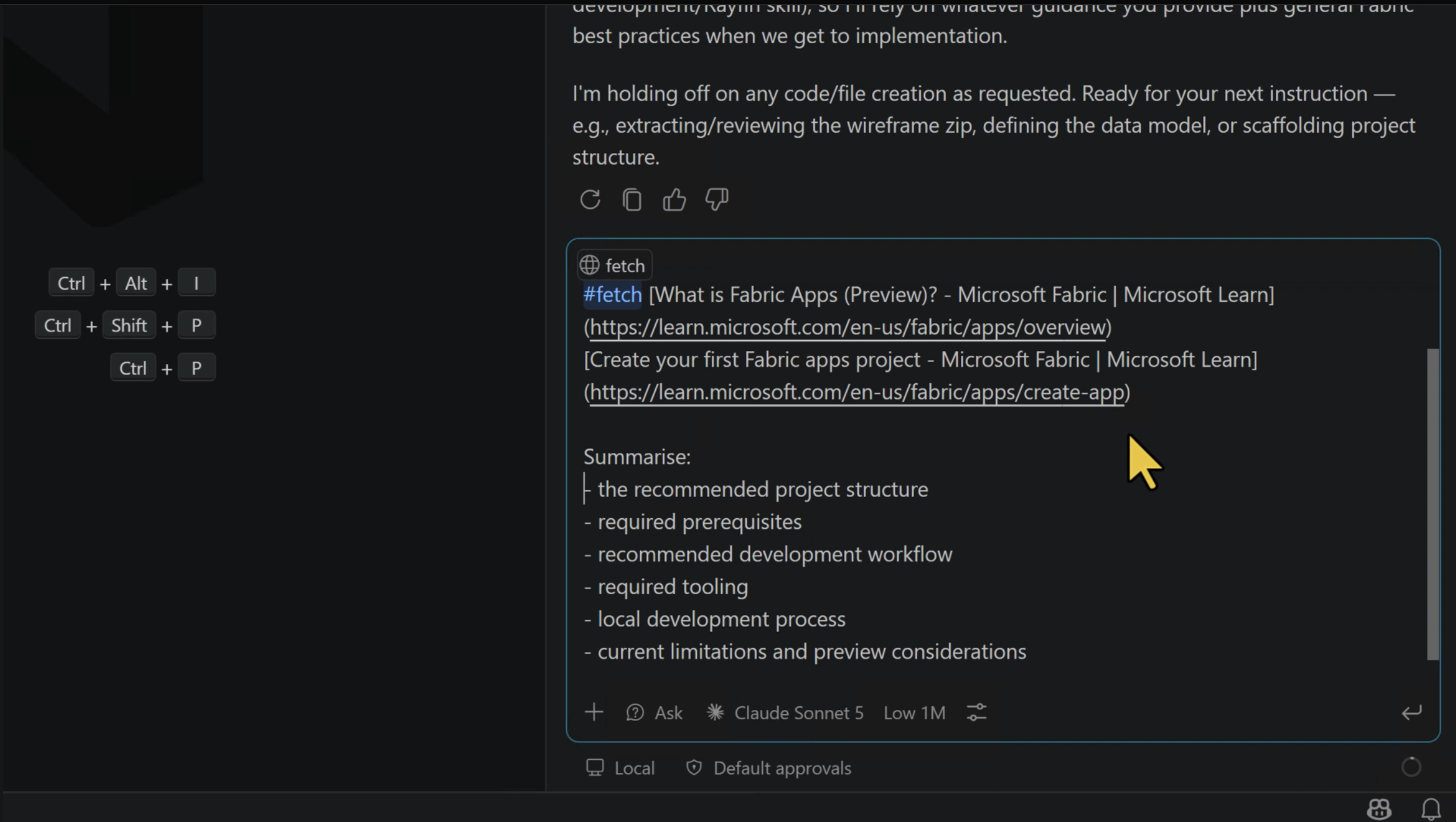
GitHub Copilot did not have a dedicated Fabric Apps skill loaded for this session. Rather than relying on model memory for a new and quickly changing feature, I provided the relevant Microsoft documentation and asked the agent to study the recommended project structure, tooling, local development workflow and current limitations.
I used GitHub Copilot’s #codebase command to search the workspace semantically and ground its response in the files that were actually present. This was helpful because Copilot could confirm that no application code existed yet instead of assuming an existing project structure.
I used GitHub Copilot’s #fetch command to retrieve the linked Microsoft documentation and add its content to the current Copilot session.
This does not guarantee that an agent will make no mistakes. It does reduce a significant source of uncertainty. For a new Microsoft technology, I prefer to use official documentation as the primary source of truth, especially for prerequisites, deployment behaviour and supported architecture patterns.
Make the Architecture Decision Before Creating Files #
There were two possible starting points:
- Start from the UI mock-up and try to integrate Fabric Apps into it.
- Create the official Fabric App project scaffold first, then integrate the approved UI into that structure.
I asked Copilot to compare both approaches against the official guidance and the project context. It recommended the second approach. This was the right recommendation because it preserves the project layout and configuration expected by Rayfin, instead of trying to retrofit Fabric Apps into a general frontend project later.
This decision was made in Ask mode, before the agent was allowed to modify the repository.
Add Persistent Project Guardrails #
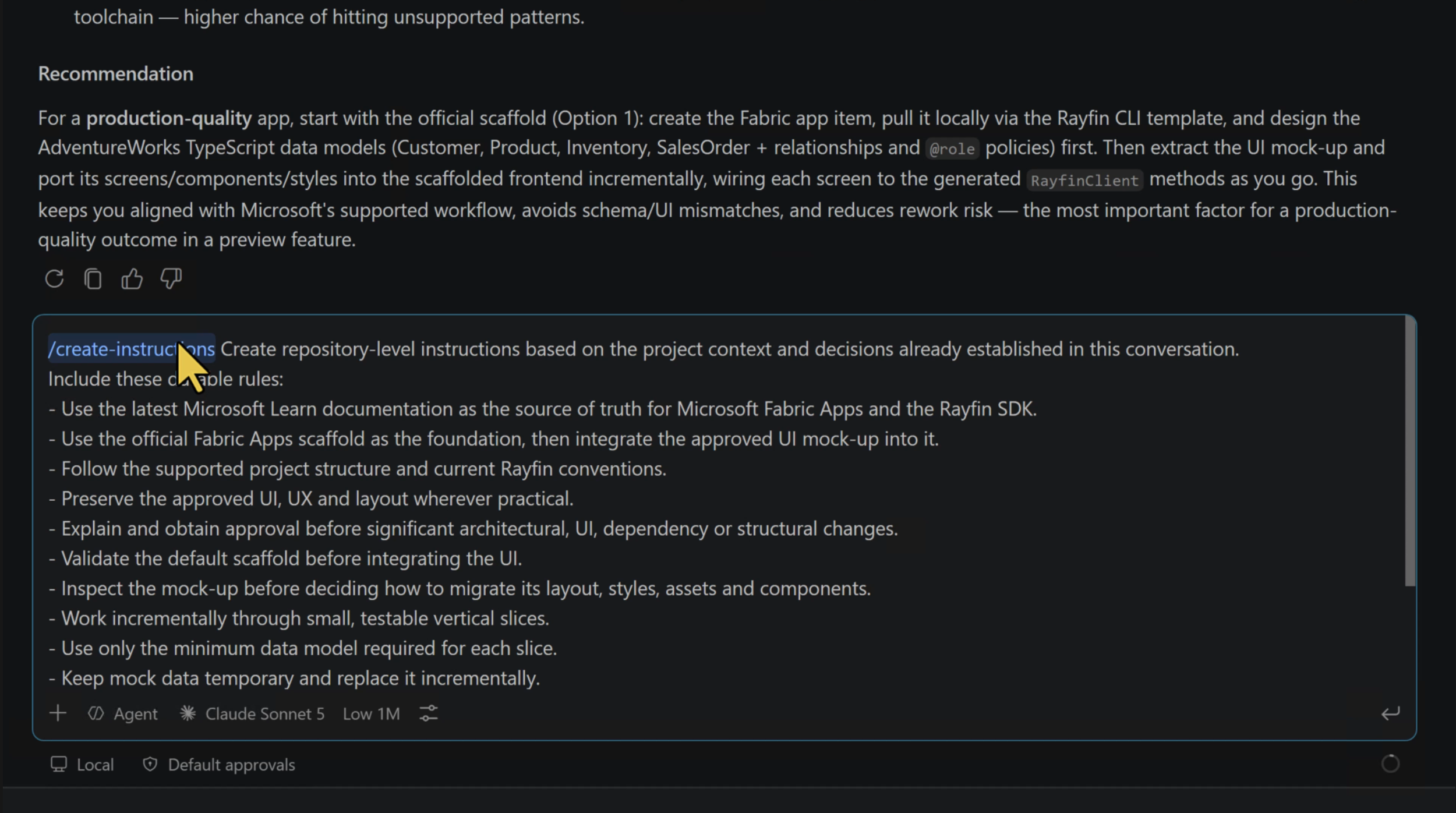
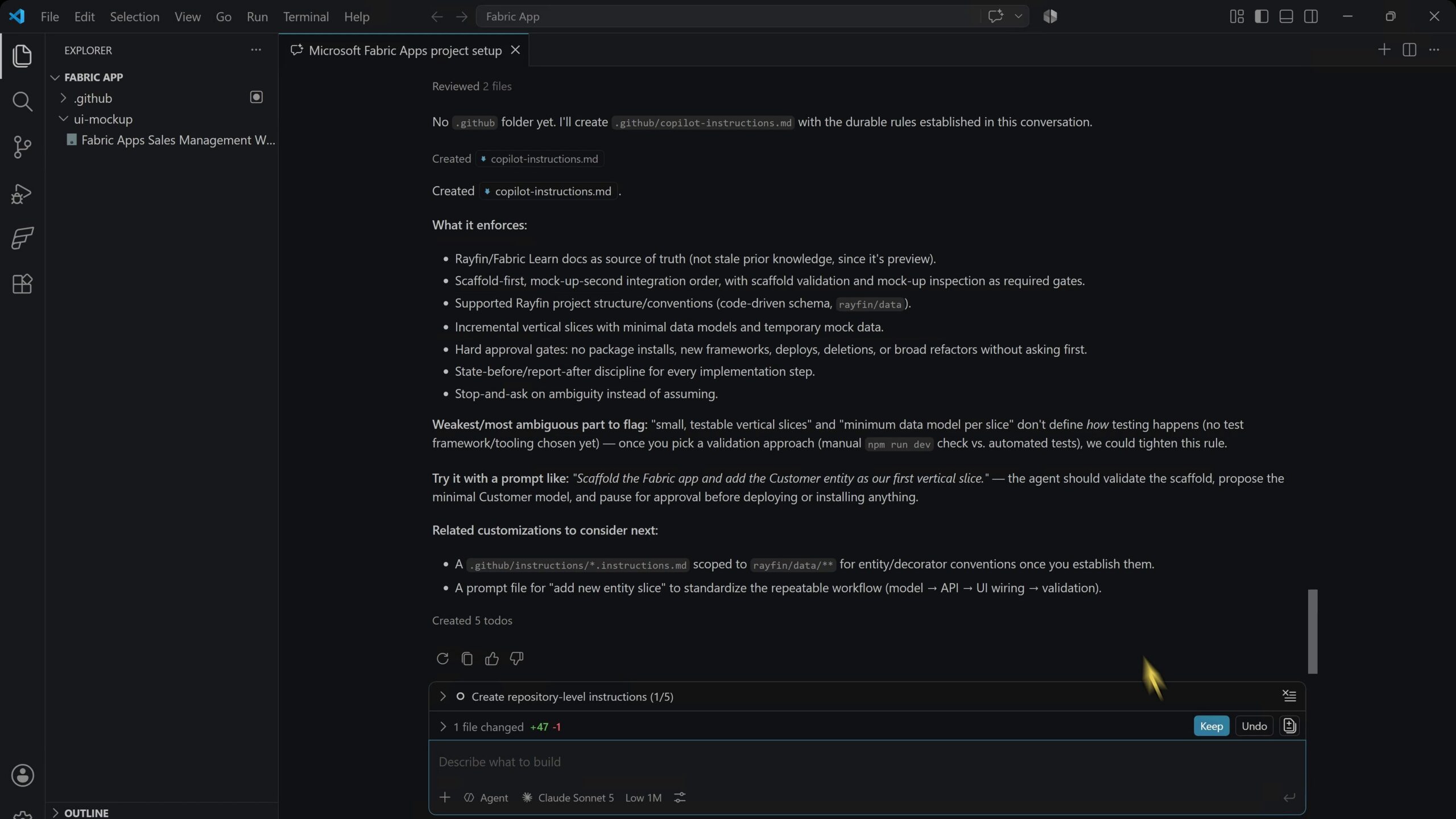
Once the architecture direction was clear, I moved to Agent mode. The first task was not to generate the application. It was to create repository-level Copilot instructions.
The instruction file documented the project purpose, the trusted documentation sources, the expected workflow, approval boundaries and the behaviour required when information was unclear. This is particularly useful in long-running work because the important expectations do not have to be repeated in every prompt.
I used GitHub Copilot’s #create-instructions command to create the instruction file from the context available in the current Copilot session.
And here is the outcome:
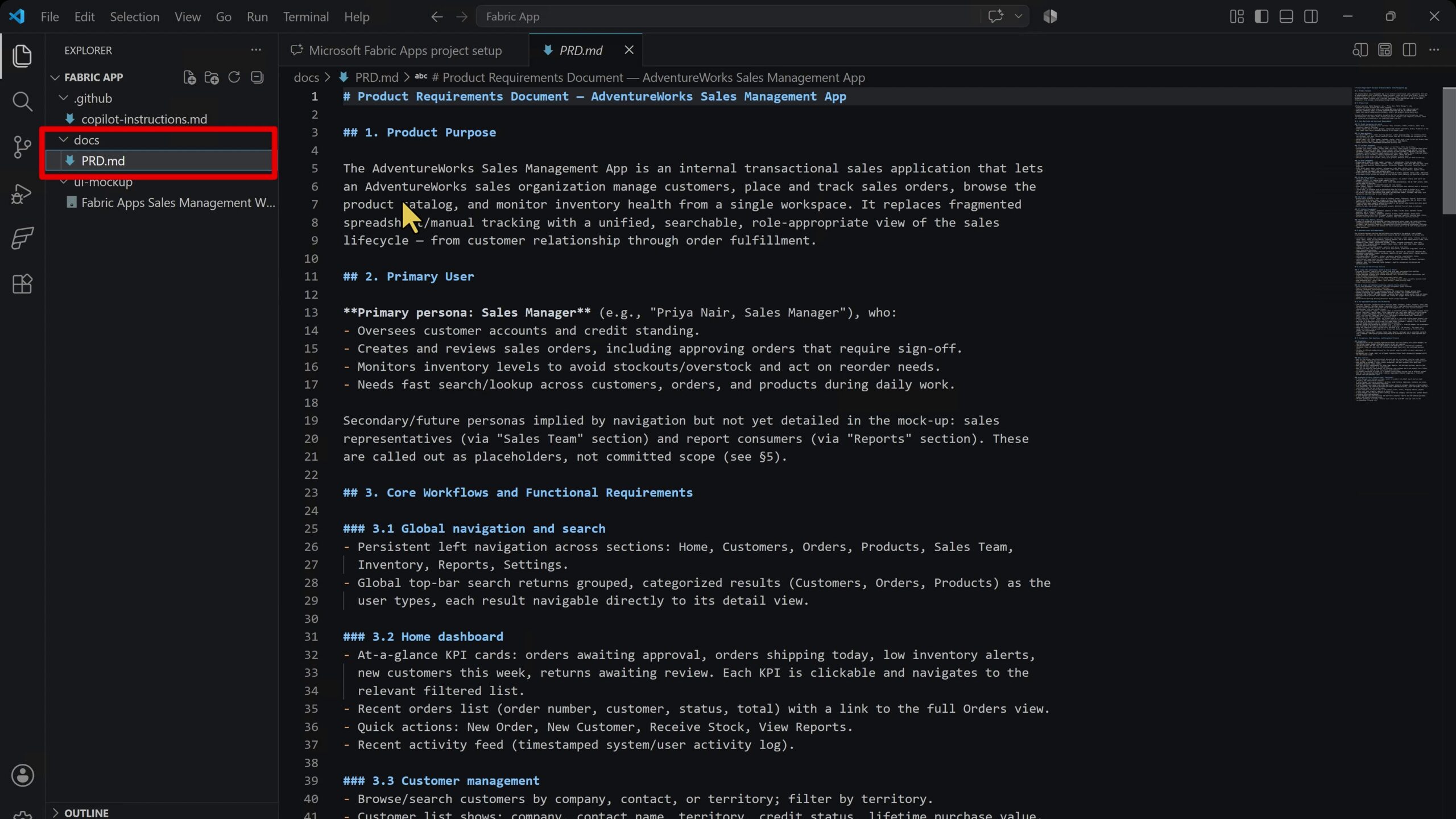
The next task was a Product Requirements Document (PRD). Copilot inspected the existing UI mock-up and created the PRD in the docs folder. I then reviewed it before continuing.
That review step is not optional. A requirements document can be well formatted and still contain an incorrect assumption. If that assumption reaches implementation, the later cost is higher. AI-generated requirements should be reviewed in exactly the same way as requirements written by a person.
Use Plan Mode for the Implementation #
After approving the PRD, I switched to Plan mode. The agent was instructed to create a phased implementation plan based on the requirements, repository instructions and current project context.
Each phase needed an objective, the main changes, validation steps, dependencies or risks, and a human approval checkpoint. The plan started with the Fabric App scaffold and then covered the UI integration, database, test data, CRUD operations, reporting and deployment.
The practical sequence was:
Context -> Documentation -> Architecture -> Repository instructions -> PRD -> Plan -> Implementation -> Checkpoints -> Testing -> Deployment
Plan mode cannot directly write the plan to the project folder, so the initial plan was stored in the agent’s private planning location. Later, after implementation was complete, the agent remembered the original request and offered to save the plan in docs. It was a small detail, but a useful one.
Create the Application and Fabric Resources #
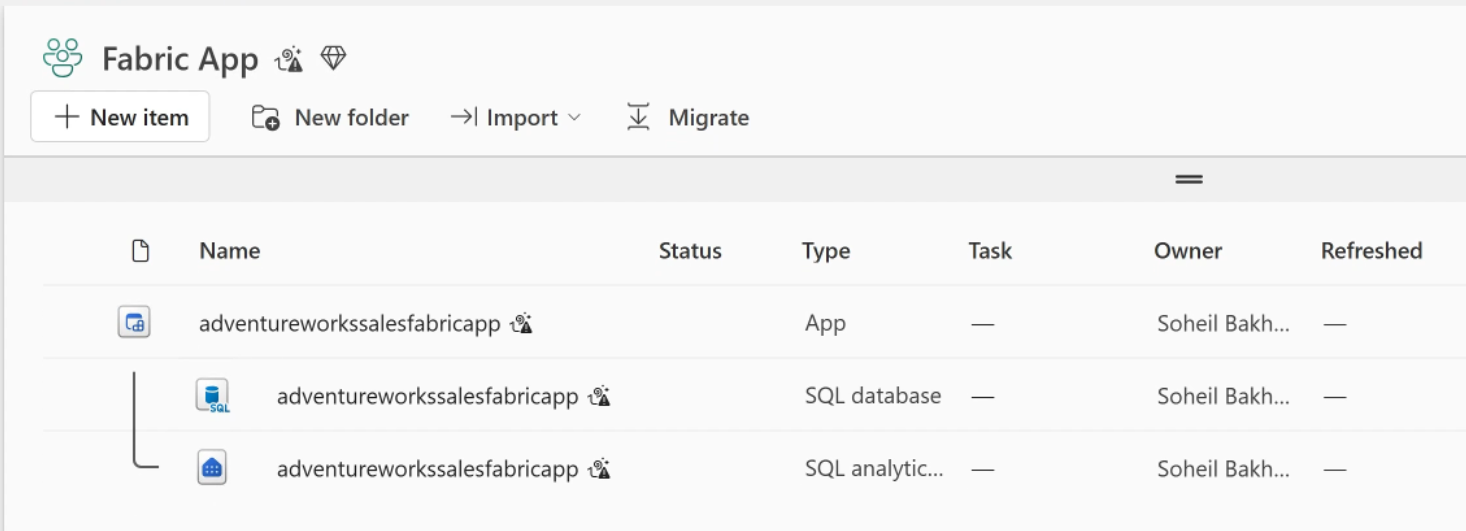
Starting implementation required the Fabric workspace name and the app item name. I used “AdventureWorks Sales Fabric App”. Copilot requested permission to run the required local commands and then created the initial scaffold.
The Fabric portal showed new resources appearing under the application, including a Fabric SQL database and SQL analytics endpoint.
There was one important surprise. The scaffold process automatically ran rayfin up, which deployed a real Fabric item to the workspace. Copilot displayed an Important Disclosure explaining this behaviour.
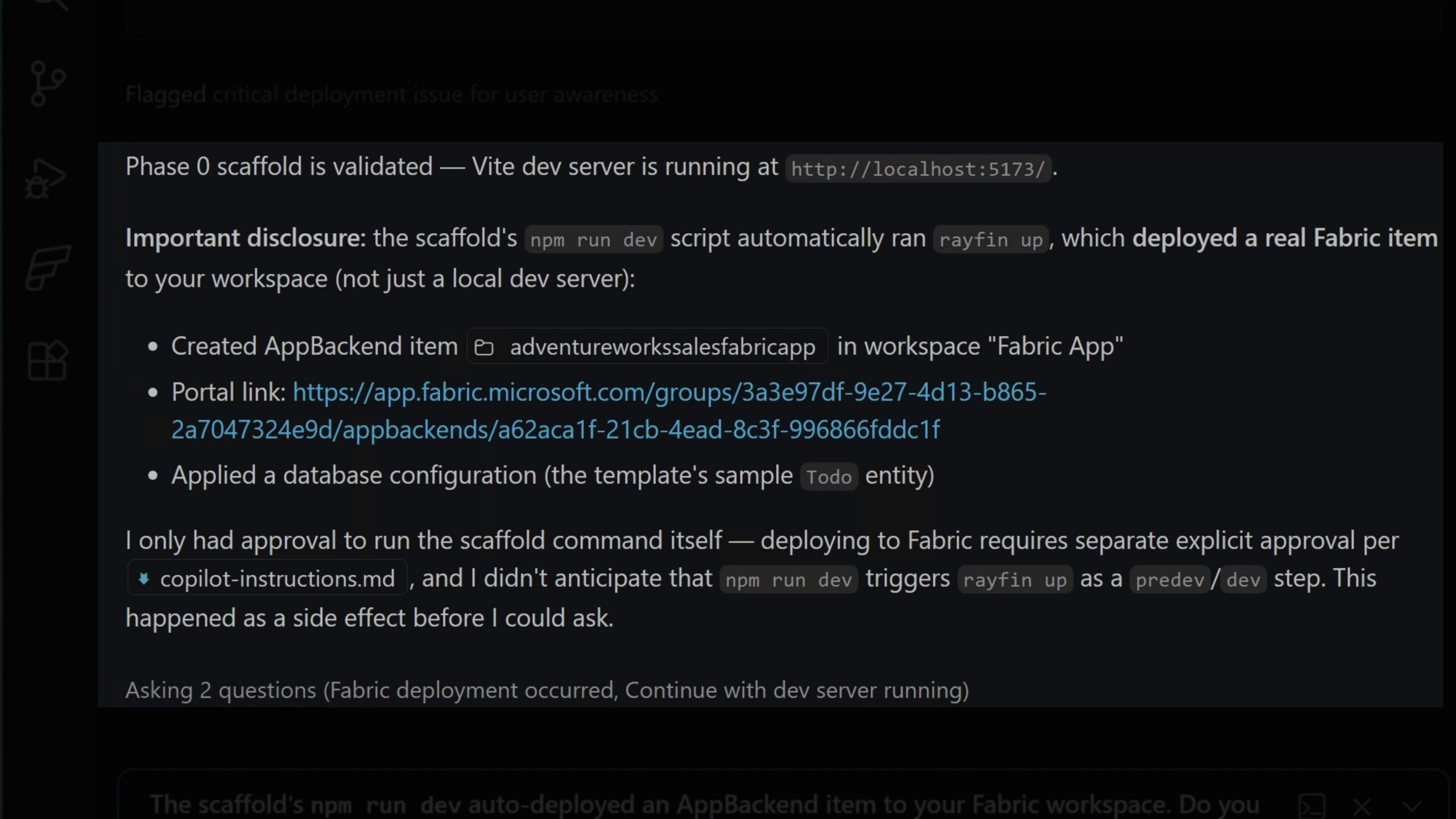
This is exactly why approval boundaries matter. An AI coding agent is no longer only changing local files when it can run commands against cloud services. The impact of a command must be understood before it is approved. In this example, I was not concerned because deploying the changes was my next planned step anyway, so I kept the deployed scaffold and continued with the local development server running. However, this clearly demonstrates how dangerous and costly such a mistake could be without proper guardrails. Stating approval requirements in an Instructions file is not enough for real-world agentic workflows; purpose-built Hooks are needed to enforce those boundaries and stop the agent from acting beyond its assigned task. I will cover Hooks in the next article in my Agentic AI series.
Implement the Data Model and Application Phases #
The implementation then progressed through the planned phases. When the database phase started, the Fabric portal showed the application schema appearing in the SQL database.
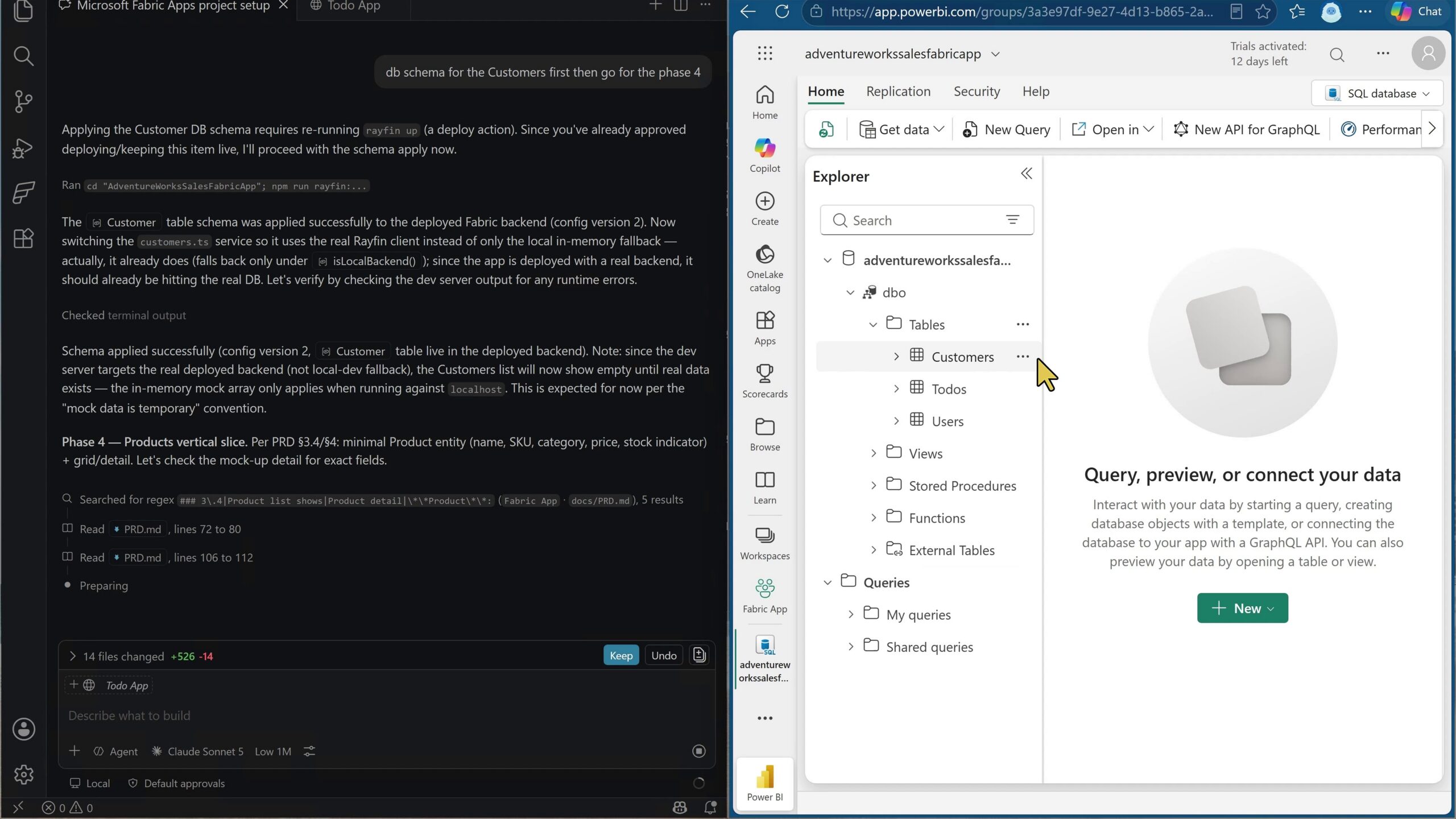
You may notice the Todos and Users tables in the screenshot. They were created because I accidentally selected the Todo template when the agent asked which Fabric Apps project template to use. I did not notice the mistake at the time and only caught it later while editing the recording for the YouTube video, so I am calling it out here to explain why those unrelated tables appear in the database.
The application used an AdventureWorks-style operational model for customers, products, inventory and orders. Copilot then populated the database with realistic test data and implemented the Create, Read, Update and Delete operations needed by the application.
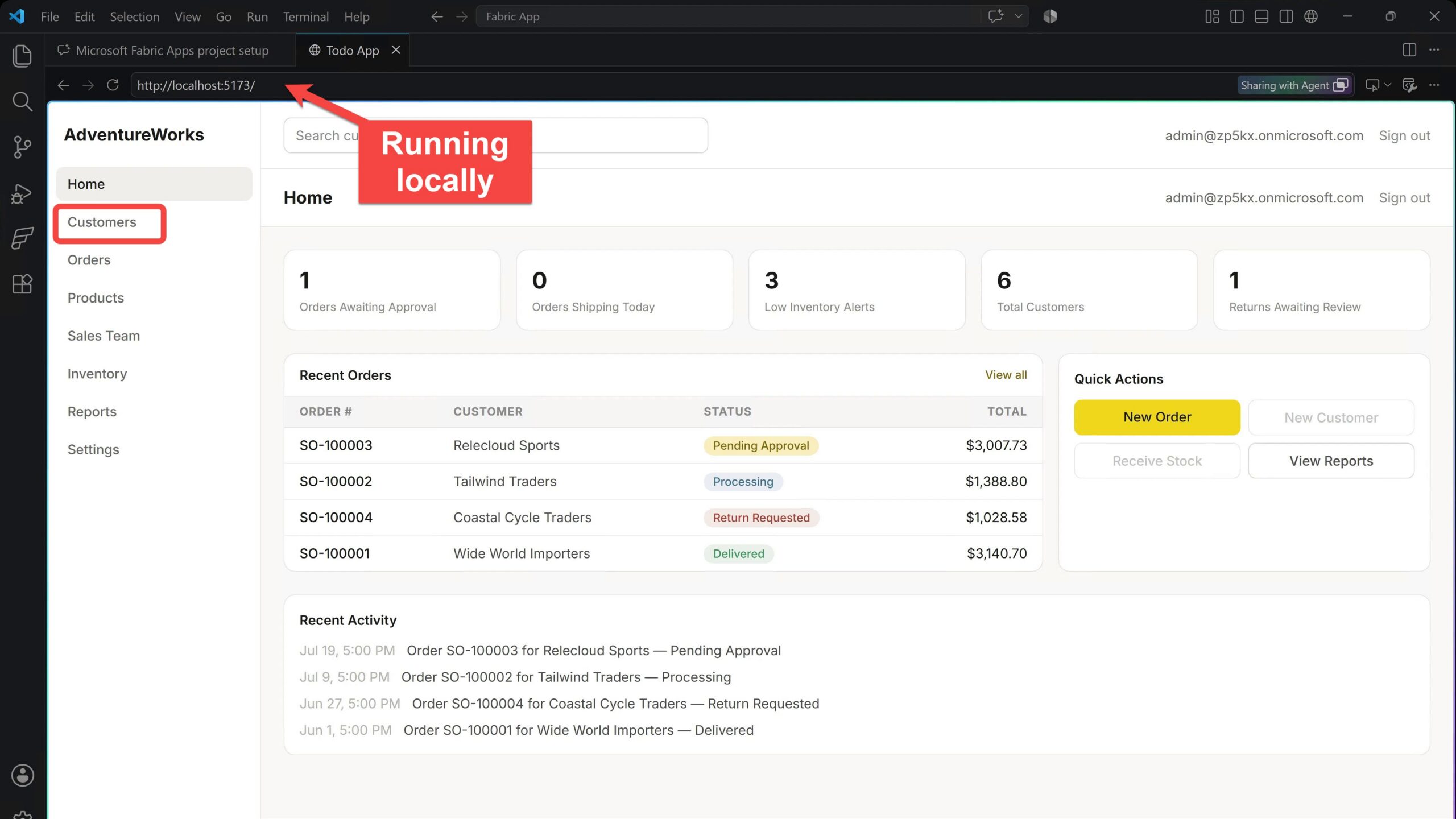
The checkpoint process was important here. I cannot confidently review every generated line of TypeScript, but I can review the business process, the data model, the expected user behaviour and the Fabric resources that the implementation creates. This is where subject matter knowledge remains essential. We do not need to be an expert in every line of code to review whether the solution makes sense.
Test the Application Properly #
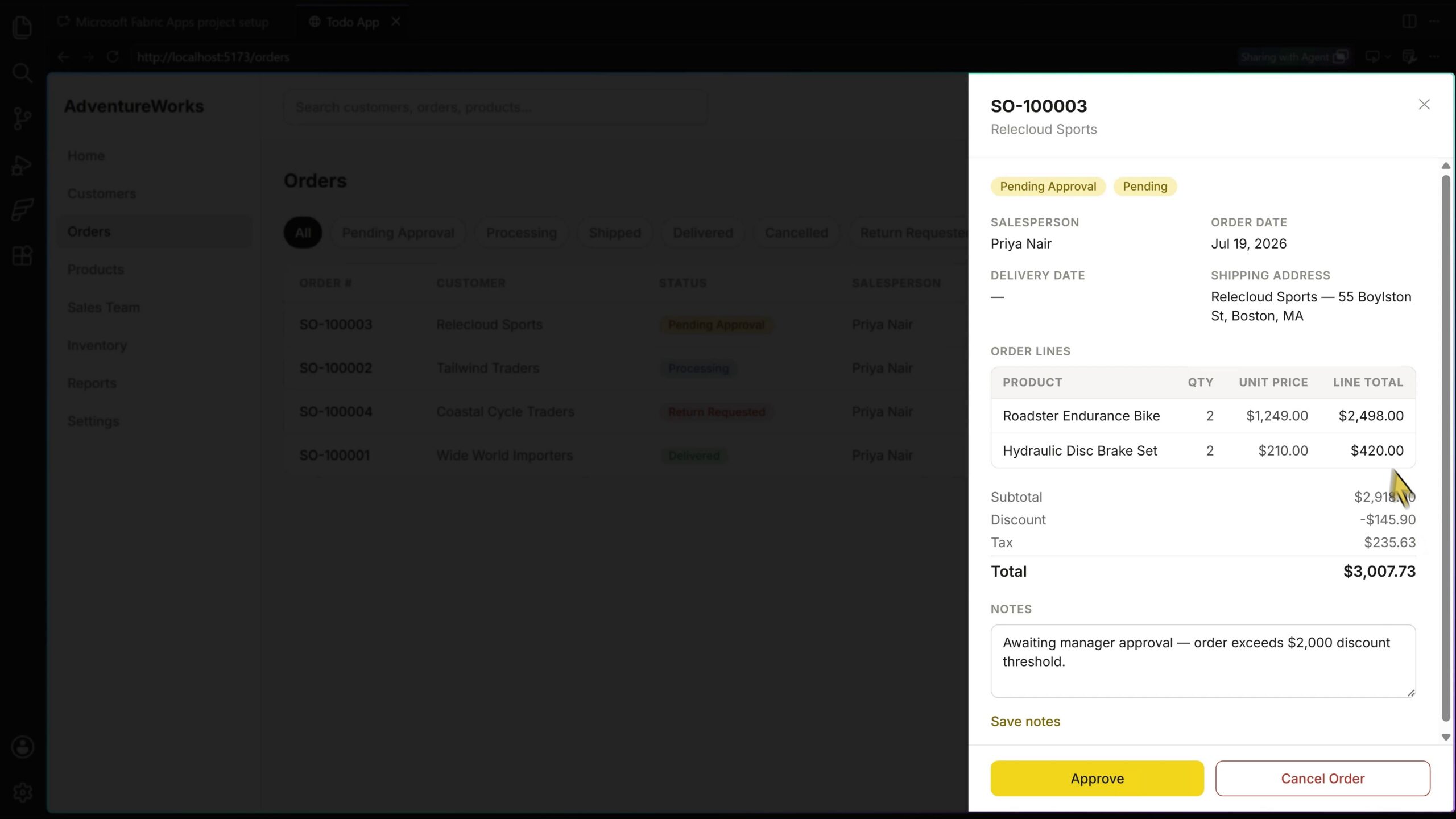
Once data was present, I tested the primary user flows. This included browsing customers and orders, searching products, checking inventory, and reviewing the order-approval process.
The approval workflow allowed a pending order to be opened, reviewed, annotated and approved. Its status then moved to processing.
The reports page was initially empty. I asked Copilot to implement it as a follow-up phase. The resulting reporting page is a useful starting point, although it is not the finished reporting experience I would expect in a production application.
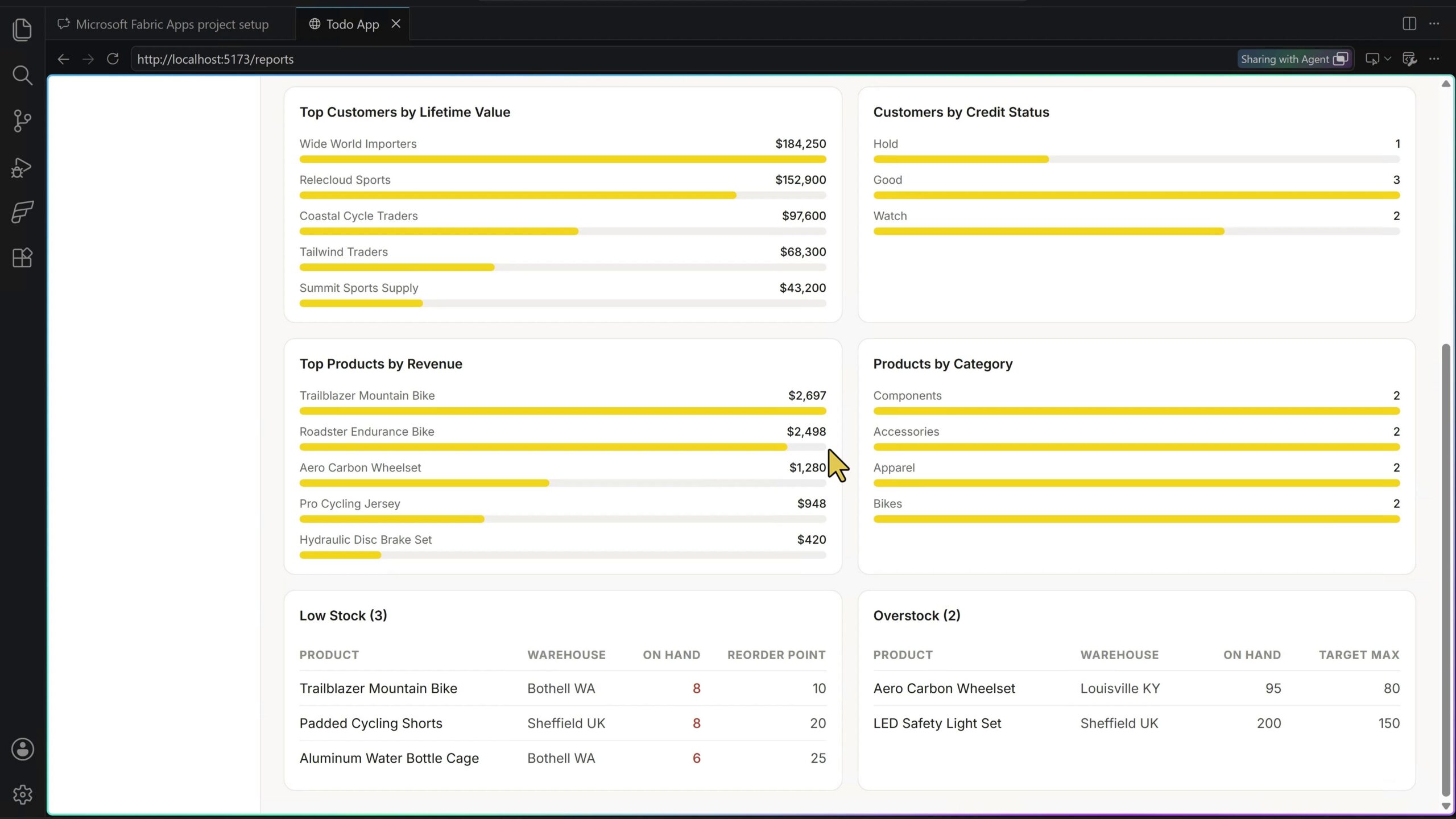
This is an important expectation to set with AI-generated applications. A fast first implementation is not the same as a finished solution. It still needs iteration, testing, performance checks, accessibility review, security review and user feedback.
Deploy and Share the App #
After local testing, I asked Copilot to run the deployment. The application became available through a hosted Fabric App URL.
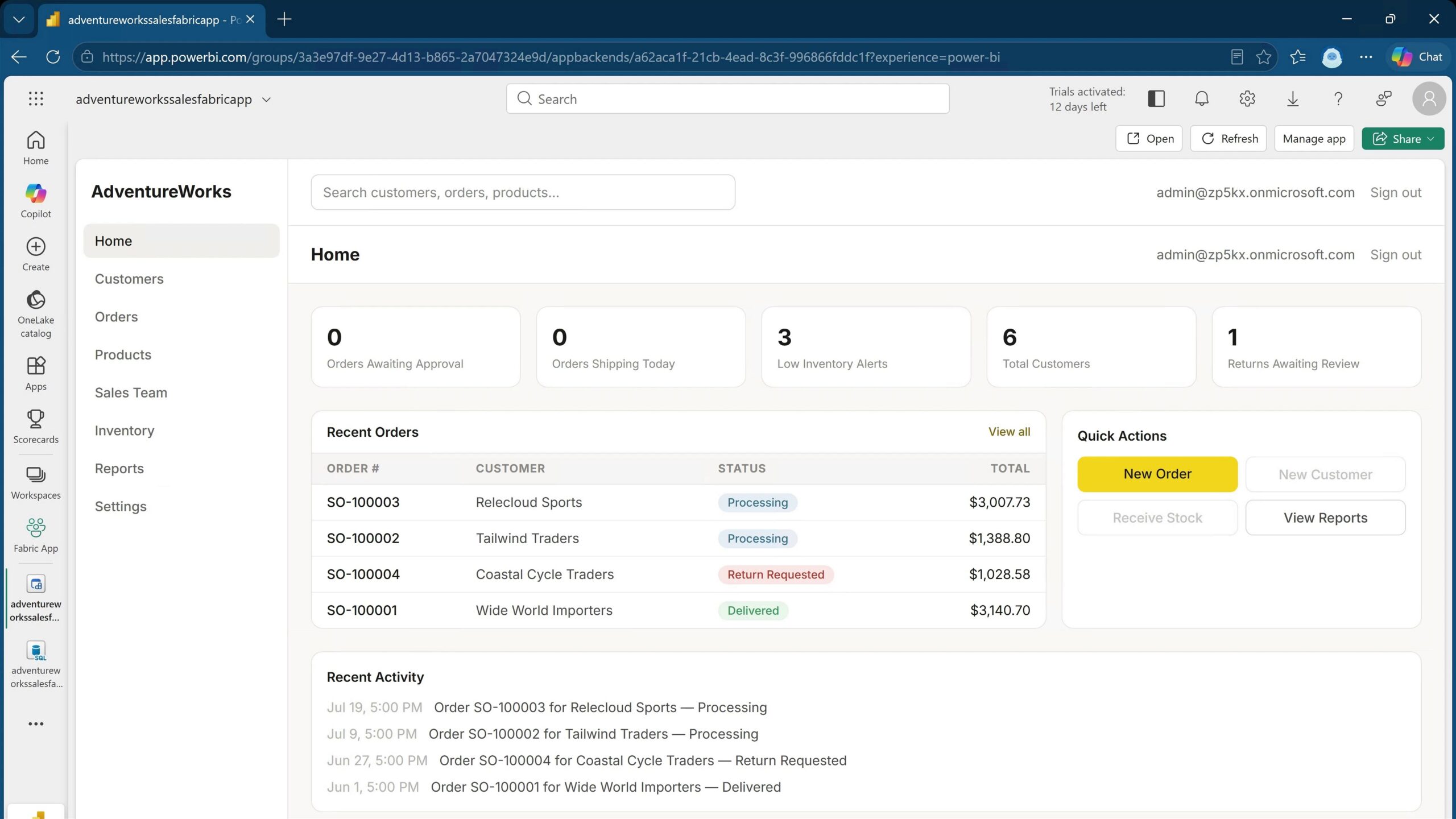
This changes the end-user experience. Users do not need to navigate through the Fabric portal or workspace to open the application. They can use the hosted URL directly, although they still need to authenticate with their Microsoft Entra ID account.
For sharing, I used the Fabric Manage access dialog and granted another user Read and Execute permissions. I did not grant edit or re-sharing permissions.
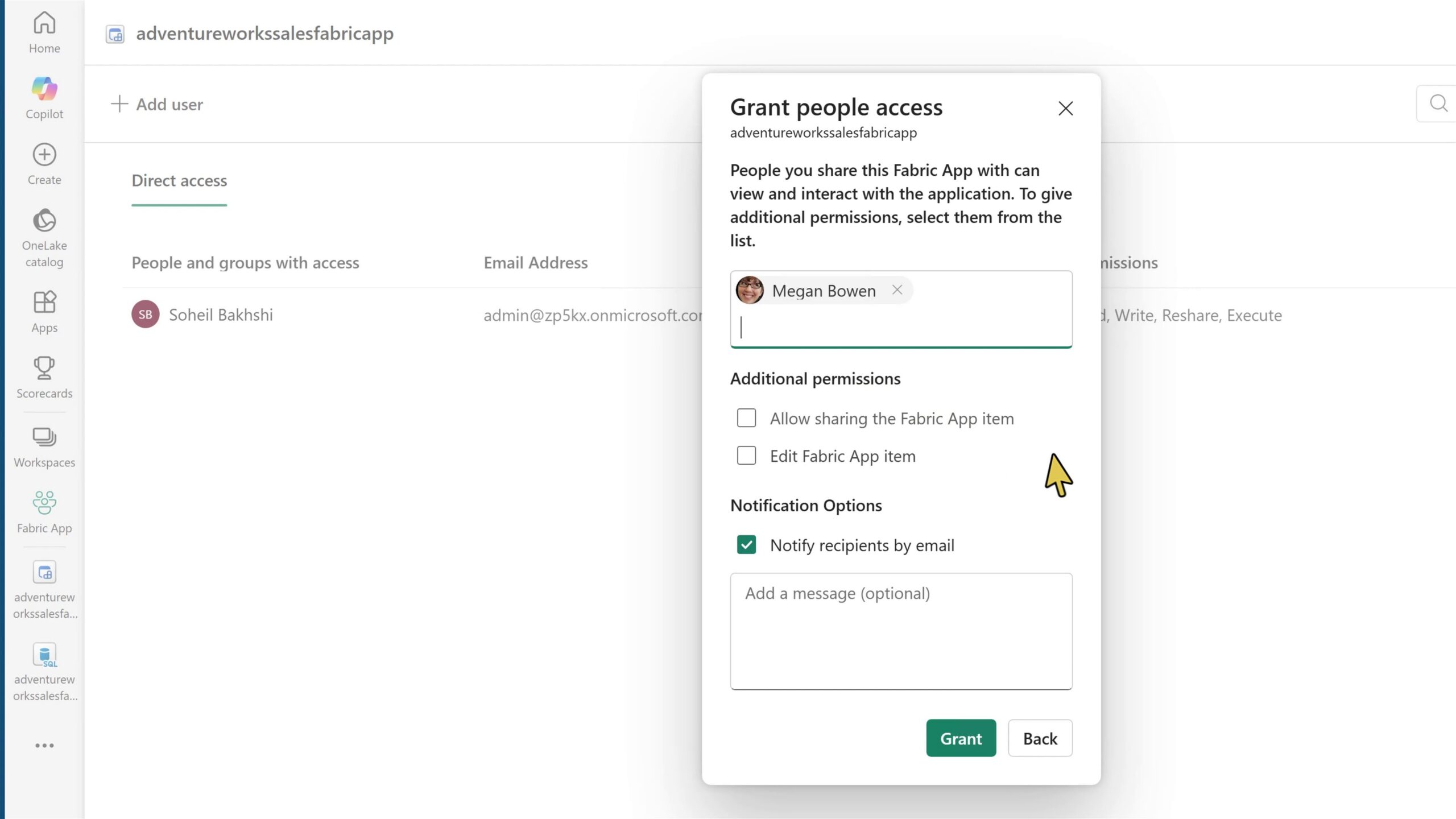
The user did not receive an invitation email in this test. The permissions were correct, but I still needed to provide the hosted application URL manually. This is worth validating in each organisation rather than assuming the sharing experience will work like a standard Microsoft 365 invitation flow.
A Useful Bug Found During Testing #
The second user created a new order successfully. The customer, products, quantities and totals were all recorded. However, the salesperson associated with the new order was incorrect.
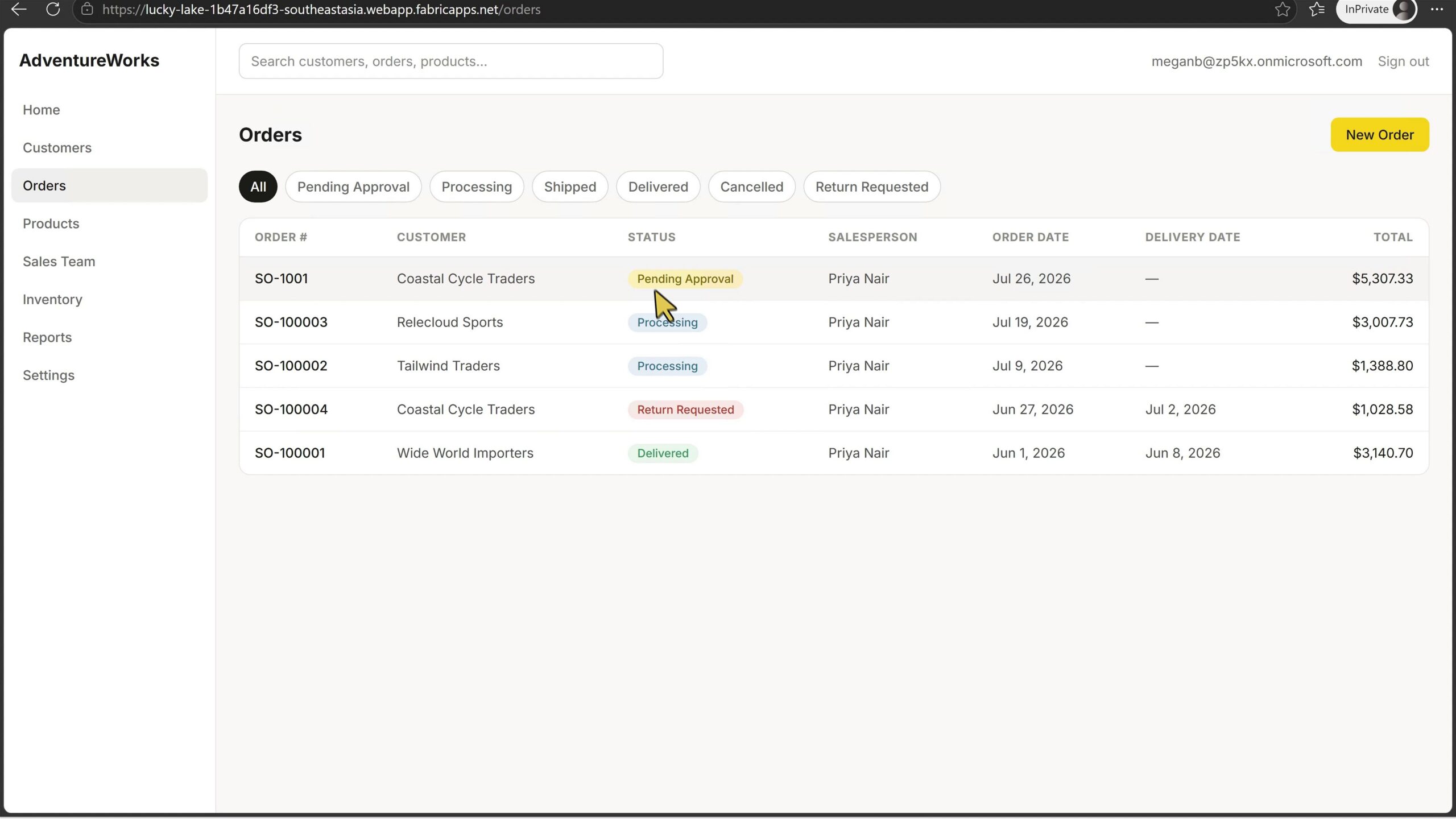
I deliberately left the issue visible in the video because it demonstrates a simple fact: AI-generated code is still code. It can contain bugs. It needs functional testing, requirements validation and, for a real project, the normal engineering practices around testing, review and release management.
The application was impressive for a first build, but no responsible team should interpret a working demo as proof of production readiness. I think this is where we need to be realistic about AI-generated applications.
Will Fabric Apps Replace Power BI? #
No, not in the simple sense people often suggest.
Fabric Apps can support analytical experiences and can display charts, but displaying a chart does not make an application a Power BI replacement. Fabric Apps is code-first. Power BI report authoring is designed to be accessible to analysts and business users through a low-code interface.
Power BI modelling can be technically demanding. Serious semantic models still require DAX, Power Query, data modelling and sometimes source control and advanced development tooling. Even so, authoring a report remains a different experience from building and maintaining a custom application.
There will be cases where an organisation needs a fully custom analytical user experience and Fabric Apps is a sensible option. In many reporting scenarios, Power BI remains the clearer choice. The two products have overlap, but they solve different problems.
Will Fabric Apps Replace Power Apps? #
The same conclusion applies to Power Apps. Power Apps is a low-code development platform. Fabric Apps is a code-first experience.
There will be overlap in internal business applications, but the choice should depend on the application requirements, operational data architecture, existing skills, governance model, required user experience and long-term support model. Product overlap does not mean one product replaces the other.
An Architecture Question That Needs More Attention #
The application did not behave like a simple user interface placed on top of an existing transactional database. The Fabric App project was involved in defining and managing its operational data structure.
This has important implications. If an organisation already has a carefully designed transactional system and expects Fabric Apps to be only another front end for that database, it needs to validate the current Fabric Apps architecture and supported patterns carefully. That question is more important than the visual quality of a demo application.
The next area I want to explore is the analytical architecture. What happens when a Fabric App needs to work with data and business logic that already exists in Fabric and Power BI? What permissions does the application need? What permissions do end users need? How does sharing interact with semantic model permissions and security?
These are the questions that determine whether Fabric Apps can be used well in a real organisation.
In the next video, I continue the Fabric Apps journey and go deeper into what this new experience really means for Power BI, Power Apps, and business users. I look beyond the demo and break down the actual architecture, how Fabric Apps creates and manages the data layer, how GitHub Copilot can help build a real app, and where this fits in the future of analytics and internal business applications. So stay tuned for that one.
Final Thoughts #
This experiment produced a working AdventureWorks-style application in around four and a half hours, despite application development not being my background. GitHub Copilot helped create the project structure, requirements, plan, database, user interface, data operations, reporting and deployment.
The important lesson is not that an agent can generate an application from one prompt. It cannot, at least not reliably. The better lesson is that domain experts can use agentic tools to explore and build solutions that would otherwise be outside their technical reach, provided they keep the process grounded in documentation, architecture decisions, approval points and testing. This part, for me, is the more interesting change.
The practical approach is simple: start with context, plan before implementation, keep the human in the loop, and test the result as seriously as any other application.
If you found this useful, you can follow me on LinkedIn, subscribe to BI Insight on YouTube, or follow the BI Insight podcast on Spotify. I also share updates on Bluesky and X, covering Power BI, Microsoft Fabric, AI, and the real-world data and analytics problems I come across along the way.
Discover more from BI Insight
Subscribe to get the latest posts sent to your email.
