

Have you ever thought about using Microsoft Fabric Apps for something other than building a traditional business application? What if you already have all your relationships, measures and business logic inside a Power BI semantic model? Do we really need to create another database for the application?
These were some of the questions I had after publishing Building a Microsoft Fabric App with GitHub Copilot without knowing how to code (you can also watch the video on YouTube). In that exercise, we used GitHub Copilot to build a transactional application for managing products, inventory and sales orders. The main objective was to understand how the whole thing works.
While building that application, I came across a few gotchas and limitations around its architecture. But there is also another Fabric Apps pattern that takes a quite different approach. Instead of creating an operational database, it uses the relationships, measures and business logic we already have in a Power BI semantic model.
Microsoft calls this the Data App template. In this article, I compare it with the operational pattern from my previous exercise, which I refer to as a Business App. They both run on Fabric Apps, but what happens underneath is different. Their security requirements, sharing model and licensing are different too. So, let’s go through what I tested, what caught me out, and where I think each pattern makes sense.
Watch the full video on my YouTube channel here: 👇
If you’d like to listen to the content on the go, here is the AI generated podcase made from the content of this blog 👇:
Business Apps: The Operational Pattern #
Check out the video on YouTube at 1:46
Let’s start with the application from the previous exercise. I refer to it as a Business App because it supports an operational process: managing products, inventory and sales orders. This is my wording for the pattern, not the name of a separate Microsoft template.
For this type of application, Fabric Apps creates and manages the operational data layer. We define what the application needs, and Fabric Apps creates the backend infrastructure as part of that process.
Underneath the application, we have Entra ID single sign-on (SSO) for authentication, a GraphQL API for reading and writing data, and a Fabric-managed SQL database to store the application data. So the application, authentication, API and database work together as shown in the following diagram.
graph LR
    User[End User] -->|Entra ID SSO| App[Fabric App Frontend]
    App -->|Read / Write| GraphQL[GraphQL API Layer]
    GraphQL -->|Data Persistence| SQLDB[Fabric-Managed SQL Database]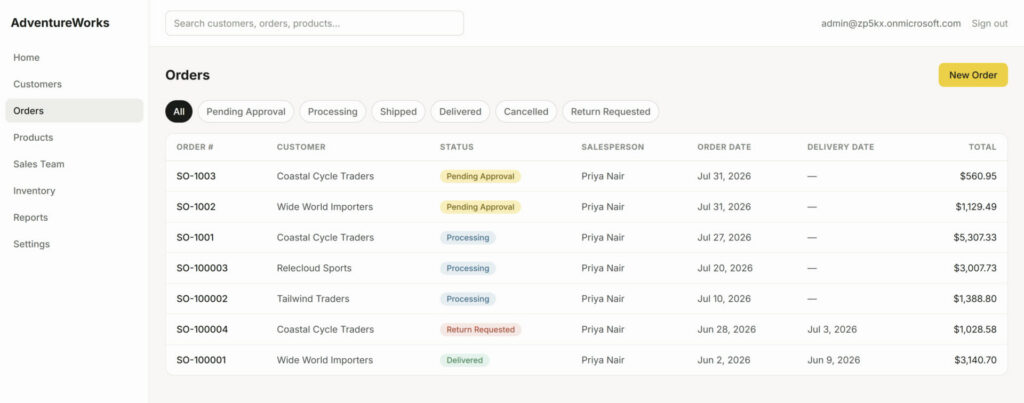
The Business App from the previous video, showing the sales order screen.
The Backend Limitation You Must Know About #
Check out the video on YouTube at 2:07
One of the first limitations I came across was around the database. At the moment, I cannot simply take an existing SQL database, with a schema that I have already defined, and tell Fabric Apps to use it as the application backend.
Fabric Apps manages this part of the application lifecycle itself. We define the data model in TypeScript code, and during deployment, Fabric Apps compiles that code and creates the SQL database schema based on the model. It also manages the schema as we make changes to the application.
This means I should not treat it like a normal SQL database where I open SQL Server Management Studio or Azure Data Studio, run an ALTER TABLE script, and expect the application to adapt automatically. The Fabric Apps documentation says that schema changes should come from the code through Rayfin. We can query the database, but changing its schema directly can create conflicts and break the application. That is a fairly important limitation to understand before choosing this architecture.
If you are like me and enjoy doing some “vibe coding” with AI assistants, I definitely suggest reading the rules for coding agents on the Rayfin documentation site. Also have a look at the troubleshooting, known limitations and FAQ sections. Some of the rules are easy to miss when we are mostly focused on getting the app running. Microsoft Learn also has an FAQ about connecting Fabric Apps to existing databases. As shown below, the answer at the time of recording was no.
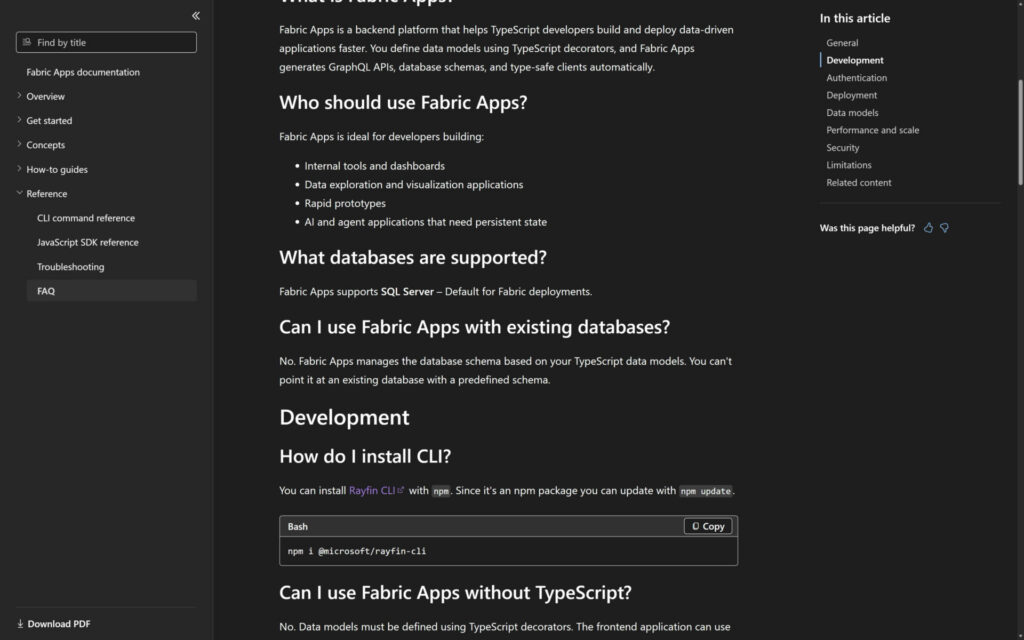
The Fabric Apps FAQ shown in the recording, explaining the existing database limitation.
Data Apps: Building on Power BI Semantic Models #
Check out the video on YouTube at 6:00
Now, let’s look at a quite different scenario. What if we do not need a transactional database or any screens for entering data? Perhaps we already have our relationships, complex DAX measures and business logic defined in a governed Power BI semantic model. Building all of that again just to create an application does not make much sense.
This is where the Data App template comes into the picture.
A Data App connects to an existing Power BI semantic model instead of creating a new database. In the video, I opened the Data App next to the Business App from our previous exercise so we could see the difference. The Data App was connected to a portfolio management semantic model, which in turn was linked to Microsoft Project data.
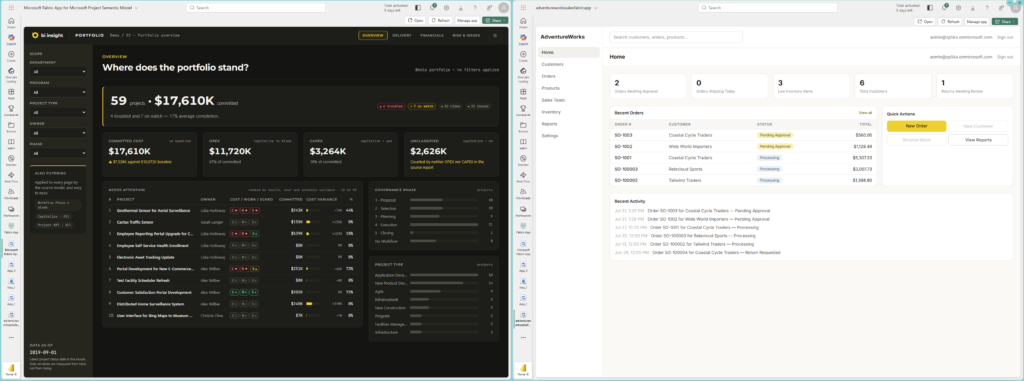
The Data App and Business App side by side. The left app uses a semantic model; the right app supports operational work.
I quite like the experience we can create with this template. In my example, it feels polished and, in some ways, cleaner than a standard Power BI report. I have navigation between pages for delivery, financials, risks and issues, slicers to filter the data, and the option to switch between dark and light modes. When I change a slicer selection, the page responds much like we would expect in Power BI. But I am no longer limited to designing everything inside the report canvas. I can shape the interface around the application experience I want to give the users.
graph LR
    User[User in Fabric Portal] -->|Entra ID SSO| App[Fabric App Frontend]
    App -->|REST Queries| DAXAPI[Execute DAX Queries REST API]
    DAXAPI -->|DAX Query Execution| Model[Power BI Semantic Model]
    Model -->|Analytical Queries| Storage[Underlying Data Engine]
Architectural & Configuration Differences #
Check out the video on YouTube at 8:13
Once I put the two applications next to each other, the architectural difference became much clearer. The Business App talks to its managed operational backend through GraphQL. The Data App sends DAX queries to an existing Power BI semantic model. That different query path also brings an administrative requirement that is quite easy to miss.
The Execute Queries REST API Requirement #
Check out the video on YouTube at 9:12
For a Data App to query a Power BI semantic model, it uses the Semantic Model Execute Queries REST API. In many Microsoft Fabric tenants, this REST API is disabled by default. So, having the application and the semantic model ready is not enough on its own.
To get this working, the Fabric Administrator needs to open the Fabric Admin Portal, go to Integration settings, find Semantic Model Execute Queries REST API, and enable it. Without this setting, the application cannot query the model. If a Data App opens but cannot retrieve any data, this is one of the first things I would check.
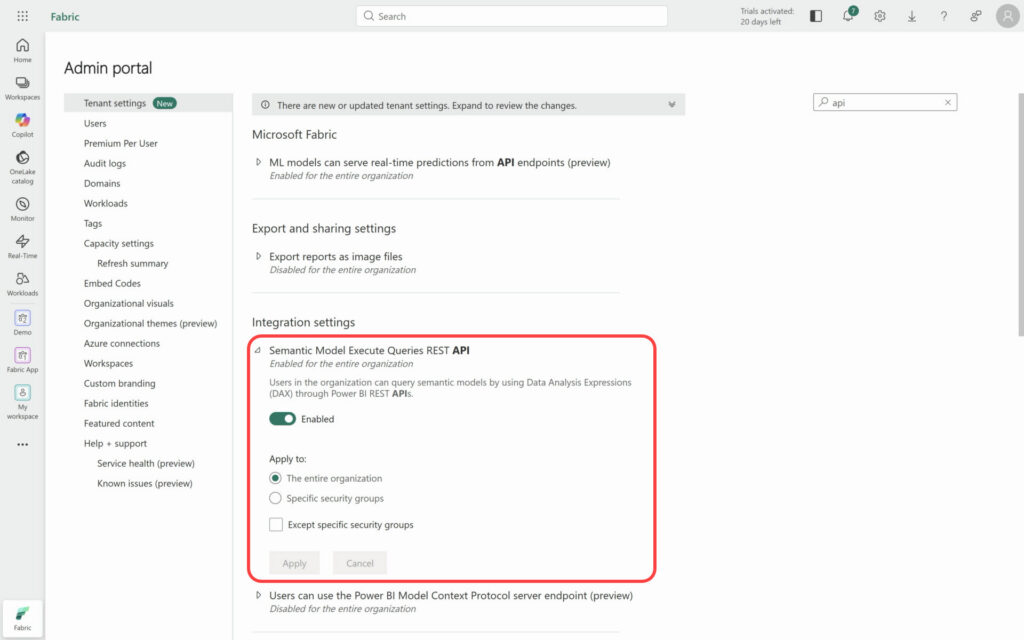
The tenant setting used by the Data App to query the Power BI semantic model.
Not Just Embedded Analytics #
Check out the video on YouTube at 10:06
At first glance, it is easy to think that this is simply a Power BI report embedded inside a web application. It is not. We are not using the familiar Power BI Embedded analytics pattern in this example, even though Power BI is still doing the analytical work underneath.
What I am building is a custom application around a particular persona, workflow or business process. The governed Power BI semantic model becomes the analytical foundation. It continues to handle the DAX calculations, security and relationships, while the Fabric App gives me control over the interface and navigation. I can create a purpose-built experience without recreating the model and business logic that already exist in Power BI.
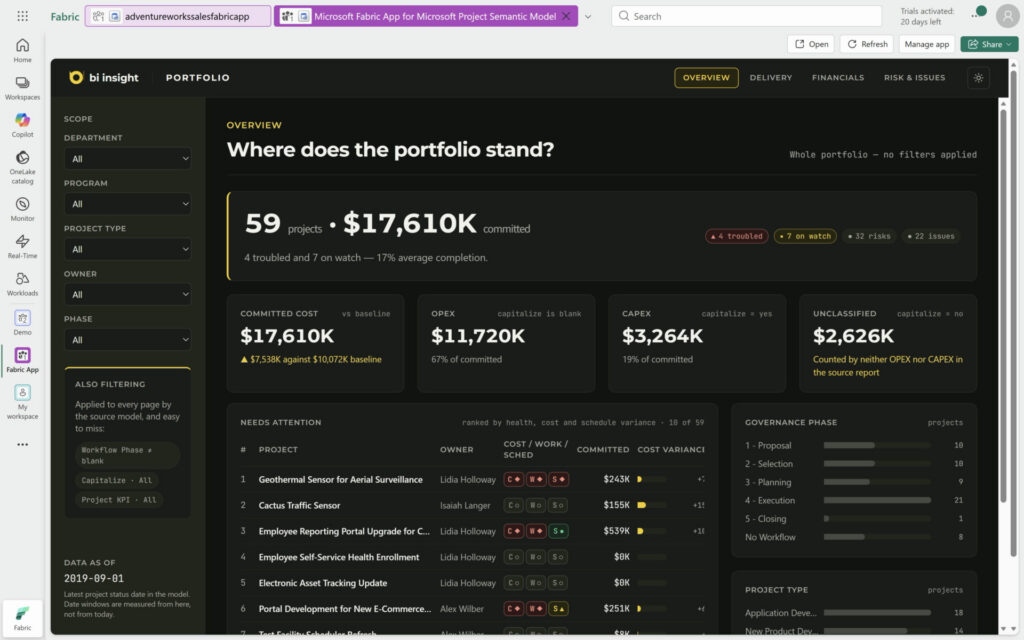
The Data App running inside Fabric, with custom navigation, filters and dark mode.
Workspace Capacity Nuances #
Check out the video on YouTube at 11:23
There is another point around workspaces and capacity. The Fabric App item itself must be in a workspace assigned to a Fabric capacity. That is required for hosting the application, regardless of which pattern we use.
The Power BI semantic model underneath does not necessarily have to sit in the same workspace as the Data App. In my test environment, the demo model was in a standard Power BI workspace and the Data App was able to connect to it without any issues. So the app and the model can have different workspace arrangements.
Having said that, there is a limitation around where we can open a Data App. A Business App can be opened using its hosted URL outside the Fabric Portal. I could not do the same with the Data App. When I tried its hosted URL directly in a browser, I received an error saying that the app could not be opened outside Microsoft Fabric. The current Microsoft documentation lists the same limitation. This matters when we decide how the users are going to access the application.
Sharing and Semantic Model Permissions #
Check out the video on YouTube at 11:54
Now let’s look at sharing. This part looks fairly simple until we test it with a real user. That is where the difference between the two patterns becomes more obvious, and where the permissions caught me out.
Business App Sharing #
Check out the video on YouTube at 11:58
For the Business App, I went to the Fabric App item, clicked Share, opened Manage Access, and invited the users using their Entra ID details. I did not have to give those consumers access to the underlying Fabric workspace. The application-level Run and interact permission, shown in the portal as Read and Execute, was enough for them to use the application and interact with its operational database. This is useful when we want people to use the app without exposing the other items in the workspace.
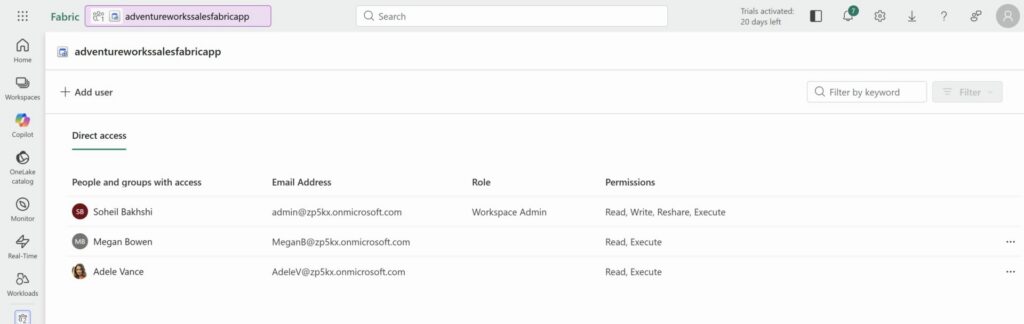
Permissions on the Business App item, with Read and Execute permissions for the consumers.
Data App Sharing: The Two-Tiered Permission Model #
Check out the video on YouTube at 13:29
The Data App has another permission layer. Sharing the Fabric App item is only one part of the process. Because the application queries a Power BI semantic model, the user also needs the appropriate permissions on that model. Access to the app does not automatically give access to what sits underneath it.
To test it, I shared the Data App with a test user, Adele. I then went to the semantic model item, 01 Portfolio Overview, opened Manage Permissions, and gave her Read permission. At that point, she had access to the application and Read permission on the model. I thought this should be enough, but it was not.
When Adele signed in and opened the Data App, it did not load the data. Instead, it showed an error saying that the semantic model did not exist or she did not have permission to access it. You can see the message in the screenshot below.
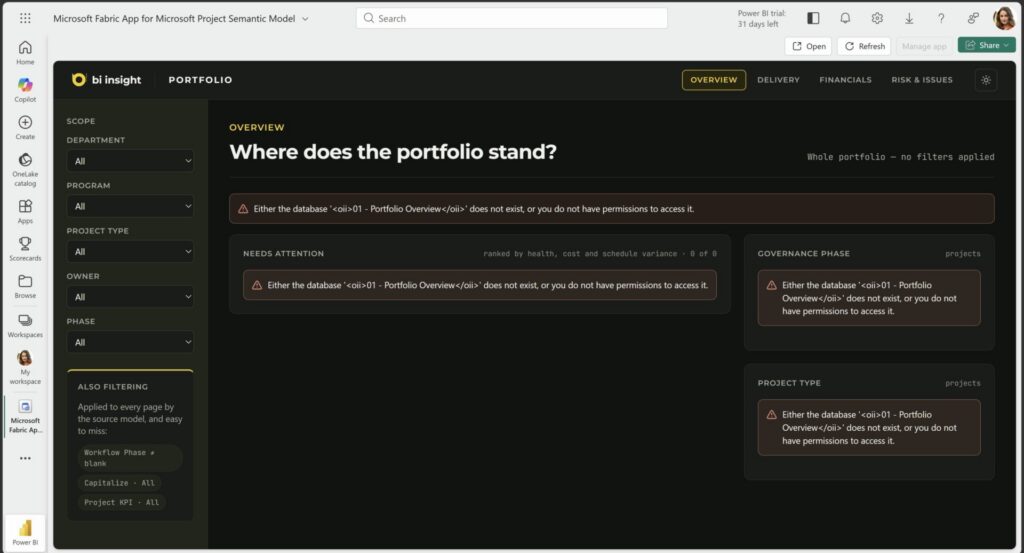
The error Adele received when the app could not access the underlying semantic model.
At the time of recording, I also had to give Adele Build permission on the semantic model. As soon as I added it, she could access the data. Build is a much wider permission than we normally want to give a consumer because it allows the user to create new content on top of the model. This was a concern for me, especially when thinking about sharing a Data App with hundreds of business users.
However, Microsoft has now changed this requirement. In the August 2026 Power BI update, Microsoft announced that Fabric App consumers need only Read permission on the underlying semantic model instead of Build. App authors still require Build permission. Microsoft stated that the change would be available by the end of August.
Therefore, the error and the workaround shown above reflect the permission requirement in my tenant at the time of recording. With the new behaviour, a consumer needs access to the Fabric App and Read permission on the semantic model. Build should be reserved for the people who author the application or need to create their own content from the model. This is a welcome change and gives us a much better least-privilege model for sharing Data Apps.
Licensing & Capacity Consumption #
Check out the video on YouTube at 16:24
Now let’s talk about licensing. This can get confusing quite quickly, so I find it easier to separate it into two parts: Capacity Licensing and User Licensing. They both matter, but they pay for different parts of running and using the application.
graph TD
    subgraph CL["Capacity Layer"]
        FC[Fabric Capacity SKU] -->|Powers Workloads| AppEngine[Fabric App Hosting & APIs]
    end

    subgraph UL["User Licensing Layer"]
        Dev[Developer] -->|Requires| Pro1[Power BI Pro + Entra ID]
        BizConsumer[Business App Consumer] -->|Requires| Free1[Entra ID + Fabric Free Licence via Hosted URL]
        DataConsumer[Data App Consumer] -->|Depends on Capacity| DataLicence[Fabric Free on F64+<br/>Pro or PPU below F64]
    end
Capacity Licensing #
Check out the video on YouTube at 16:48
Whether we use a Business App or a Data App, the Fabric App item runs on Fabric capacity. Its compute operations, API handling and backend storage consume capacity units (CUs) from the capacity assigned to the workspace. So neither pattern removes the Fabric capacity cost from the equation.
User Licensing Differences #
Check out the video on YouTube at 17:06
User licensing is where the two patterns start to look quite different. The requirements depend on who is using the application and how they access it. This can have a noticeable cost impact when we plan to share an app with many people:
- Developers: For both application patterns, developers need a Power BI Pro licence on top of access to a Fabric capacity workspace. Having the capacity alone does not cover the developer’s user licence.
- Business App Consumers: This one is quite interesting. In my testing, a Business App consumer did not need a Power BI Pro licence when opening the app through its hosted URL outside the Fabric Portal. A valid Microsoft Entra ID account with a Microsoft Fabric Free licence was enough, provided that I had shared the app with that user. If the organisation uses an F64 SKU or higher capacity, free consumption is also included through the Fabric experience.
- Data App Consumers: At the time of recording, my consumers needed a Power BI Pro licence because Build permission was still required on the semantic model. With the new Read-only consumer permission, the licence requirement depends more directly on the capacity hosting the semantic model. If the model is in an F64 or larger Fabric capacity, or a qualifying Power BI Premium capacity, a consumer with a Fabric Free licence can view the content when they have Read permission. On Fabric capacities smaller than F64, or in a standard shared Power BI workspace, the consumer still needs Power BI Pro or PPU. So the capacity behind the semantic model is now an important part of the licensing calculation.
API Throttling Considerations #
Check out the video on YouTube at 20:44
There is another gotcha I found while testing the Data App. Because it uses the Execute DAX Queries REST API, quick interactions or moving rapidly between pages can hit the API rate limits. I noticed this when I clicked between the application pages too quickly. It did not happen every time, but it happened often enough to be noticeable. If we design an interface with lots of interactions, the API limits need to be part of that design, not something we discover after deployment.
Anonymous Access Pattern #
Check out the video on YouTube at 21:39
Before putting the two main patterns next to each other, there is one more scenario worth mentioning: Anonymous Access. It is more specialised, but it can be useful when an application is genuinely intended for public users.
In the Admin Portal, under the Fabric Apps settings, there is a tenant setting called Anonymous data access for Fabric Apps. A Fabric tenant administrator must enable this first. The application developer must then define an anonymous role in the data model and specify exactly which operations that role can perform. Enabling the tenant setting alone does not make the application data public. The anonymous data access documentation explains how these two controls work together. The screenshot below shows the setting disabled in my demo environment.
This can be useful for public surveys, interactive forms or public reference data. But anybody who can reach the application URL can use the operations assigned to that anonymous role. Therefore, I would give it the narrowest possible permissions and never expose personal, financial or internal business data through it. For a normal internal application, I would keep anonymous access disabled. It is a completely separate scenario from sharing an app with signed-in users in our organisation.
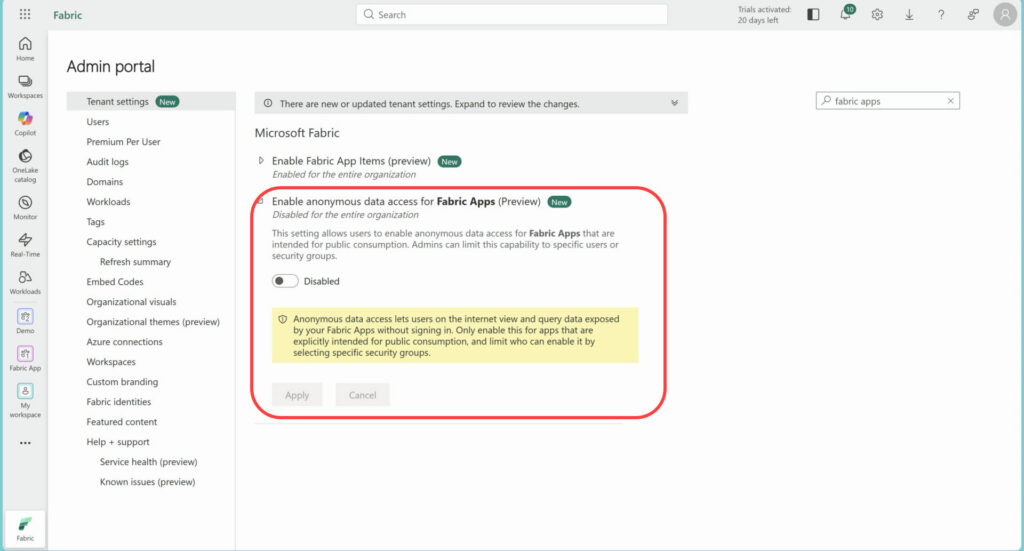
The anonymous data access setting, left disabled in the demo.
Business App vs Data App: Comparison Matrix #
Check out the video on YouTube at 8:13
We have covered quite a lot so far. I put the main differences in one table, mostly as a reference we can come back to when deciding which pattern suits our requirements:
| Architectural Dimension | Business Apps | Data Apps |
|---|---|---|
| Primary Purpose | Operational, transactional, and data entry workflows | Analytical dashboards, custom workflows, and data exploration |
| Data Foundation | Fabric-managed SQL database | Existing Power BI semantic model |
| Backend Model Ownership | Application-managed via TypeScript models | Existing governed Power BI semantic model |
| API & Query Layer | GraphQL API | Semantic Model Execute Queries REST API (DAX) |
| Workspace Requirement | Must reside in a Fabric capacity workspace | App item requires Fabric capacity; model can sit in standard Power BI workspace |
| User Sharing Model | Application-level access only | Application access + Semantic Model Read permission for consumers |
| Consumer Licensing | Fabric Free users in the tested hosted URL scenario | Fabric Free on F64+ or Premium; Pro or PPU below F64 |
| Portal Access | Accessible via Hosted URL and Fabric Portal | Restricted to Microsoft Fabric Portal only |
Practical Guidance: Which Pattern Should You Choose? #
Check out the video on YouTube at 22:35
So, which one should we choose? I would not start with the product name. I would start with a much simpler question: what do the users actually need to do?
If they need to enter and change operational data, that points in one direction. If the governed analytical model already exists and they need a more tailored experience around it, that points somewhere else. And if a normal Power BI report already meets the requirement, I would not build a custom application just because I can. The following diagram shows how I think about that decision.
graph TD
    Start[New Application Requirement] --> Q1{Is the primary task<br/>data entry/transactions?}
    Q1 -->|Yes| BizApp[Business App<br/>SQL DB + GraphQL]
    Q1 -->|No| Q2{A governed semantic<br/>model already exists?}
    Q2 -->|Yes| Q3{Need UI navigation<br/>Power BI can't support?}
    Q3 -->|Yes| DataApp[Data App<br/>DAX API + Custom UI]
    Q3 -->|No| PBIReport[Standard Power BI Report]
    Q2 -->|No| BuildModel[Build Semantic Model First]
1. Choose a Business App when: #
Check out the video on YouTube at 22:42
- You are building an internal operational application, for example an inventory tracker, sales order form or task management system.
- You need users to enter data, perform write-back or store transactional data directly inside Microsoft Fabric as part of their daily work.
- You want Fabric to handle authentication, database creation and API deployment together, allowing you to focus on the application itself.
- You want to share operational tools with internal employees without assigning a Power BI Pro licence to every consumer.
2. Choose a Data App when: #
Check out the video on YouTube at 23:17
- You already have a governed Power BI semantic model, with the measures, relationships and RLS rules that your analytical requirements depend on.
- Your users need a custom application experience, light and dark modes, or particular navigation flows that you cannot provide through the standard Power BI report canvas.
- You want to build an analytical tool around a specific persona or business process, with an interface designed around how those users work.
3. Stick with standard Power BI Reports when: #
Check out the video on YouTube at 24:06
- An interactive report with the usual slice-and-dice capabilities already meets the business requirements and gives users the experience they need.
- In many enterprise scenarios, a standard Power BI report is exactly what the users need. We do not have to replace it just because Fabric Apps gives us another option. The decision should come from the user’s workflow and the problem we are trying to solve.
Final Thoughts #
Check out the video on YouTube at 24:44
Microsoft Fabric Apps is still in public preview. I expect some of the features, licensing requirements and administrative controls to change before General Availability. What I have explained here reflects what I tested and what the Microsoft documentation says at the time of publishing, so I will keep an eye on these details as the platform develops.
After building and testing both patterns, I think Fabric Apps is a very promising addition to the Microsoft Data Platform. But the value is not simply that we can build another type of application in Fabric. The interesting part for me is that the platform now supports two quite different directions. We can build an operational application with its own managed data layer, or put a custom experience on top of an analytical model that we already trust and govern.
Having said that, I would not jump into development before understanding what happens underneath. The managed database lifecycle surprised me in the Business App. The semantic model permission requirement caught me out in the Data App, although the new Read-only consumer access makes that part much better. The licensing and API limits can also change the design once we move from a demo to real users. These are not small implementation details. They can decide whether the pattern is suitable for the project at all.
What do you think about Microsoft Fabric Apps? Where do you see it fitting into your organisation? Would you use it for an operational Business App, build a Data App on top of an existing semantic model, or simply stay with a Power BI report? Let me know your thoughts and questions in the comments below!
If you found this useful, you can follow me on LinkedIn, subscribe to BI Insight on YouTube, or follow the BI Insight podcast on Spotify. I also share updates on Bluesky and X, covering Power BI, Microsoft Fabric, AI, and the real-world data and analytics problems I come across along the way.
Discover more from BI Insight
Subscribe to get the latest posts sent to your email.
